Quick answer: one of these locks reads a fingerprint and the other has no keyhole on the outside at all, and those two facts decide most of this purchase. Take the eufy Smart Lock C220 if you want print-and-go entry with a mechanical key still in reserve, for a price tier less than the Yale. Take the Yale Assure Lock 2 with Wi-Fi if you want Apple Home working the day you install it and a door with nothing on the outside for anyone to pick.
The Short Version
eufy Smart Lock C220
The C220 is the only one of the two that reads a print, and it keeps a mechanical cylinder as the last resort. Wi-Fi lives in the lock body, so the eufy Security app reaches it without a plug-in bridge. It also sits a price tier below the Yale, which matters if you are doing more than one door.
See eufy Smart Lock C220 →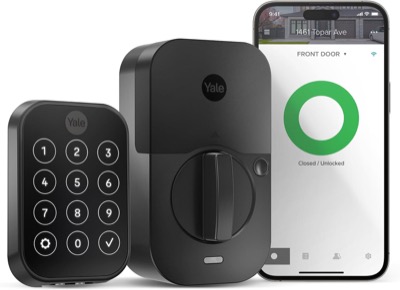
Yale Assure Lock 2 with Wi-Fi
Apple Home works over the lock's built-in Bluetooth with nothing extra bought or installed, and the Wi-Fi module in the slot adds Alexa, Google and remote access through the Yale Access app. The key-free face is the quieter advantage: no keyway means no cylinder to rake, bump or copy at a hardware store.
See Yale Assure Lock 2 →Both are full deadbolt replacements, so the install work is the same either way and neither is an option for a door you are not allowed to modify. If you are renting, our smart lock roundup covers the retrofit models that leave the existing deadbolt in place.
Side by Side on the Door
The rows below are the ones that actually change which lock you should buy. Where a spec is specific to the exact listing rather than the product line, the cell says so instead of guessing.
| Feature | eufy Smart Lock C220 | Yale Assure Lock 2 with Wi-Fi |
|---|---|---|
| Price tier | $$ | $$$ |
| Ways to unlock | Fingerprint, PIN code, app, physical key | Touchscreen code, app, voice |
| Fingerprint reader | Yes | Not on this SKU; Yale sells fingerprint as a separate model |
| Connectivity | Wi-Fi built into the lock, no bridge | Wi-Fi module fitted in the slot, no bridge |
| Apple Home | Check listing | Yes, built in over Bluetooth, no module needed |
| Apple Home Key (tap to unlock) | Check listing | No, that is the separate Assure Lock 2 Plus |
| Matter | Check listing | Separate swap-in module, sold separately, one module at a time |
| Alexa and Google | Check listing | Yes, through the fitted Wi-Fi module |
| Certification | Check listing | ANSI/BHMA Grade 2 |
| Install type | Full deadbolt replacement | Full deadbolt replacement |
| Physical key backup | Yes, mechanical cylinder | No keyway on this SKU; Yale also sells a keyed touchscreen version |
| Dead-battery entry | Mechanical key | 9V battery held to the exterior terminals, then your code |
Price tiers are approximate. $ = under $50, $$ = $50 to 150, $$$ = $150 to 300, $$$$ = over $300. Tap any link for the current Amazon price.
Read that table as two different bets. The eufy spends its budget on entry methods and leaves platform support to whatever the current listing says. The Yale spends its budget on the deadbolt itself and on a platform story that is settled before you open the box.
Fingerprint or Touchscreen: What You Will Actually Do at the Door
A fingerprint is the fastest unlock there is when it works, and the most temperamental one when it does not. Capacitive sensors read the ridges of a finger with a small electrical charge rather than photographing it, which is why the same finger can succeed in the morning and fail that evening after you have been washing dishes or working outside. The template lives on the lock, not in the cloud, so the scan still works with your internet down. Only the remote features need a connection.
That makes the C220's print reader a convenience layer rather than the thing holding your door shut, which is the right way to think about any fingerprint lock. If you want to see how it compares against other print readers rather than against a keypad, our guide to fingerprint smart locks puts it next to the Kwikset and Ultraloq alternatives.
The Yale answers the same problem with an edge-to-edge touchscreen and nothing else on the exterior. Typing a code is slower than a scan, but it never cares about wet hands, and it is the one entry method you can give someone over the phone without them installing anything. Cold is the real variable for both: owners of touchscreen-style locks in general describe the panel getting sluggish as temperatures drop toward freezing, which is worth weighing if your door faces an unheated porch or a north wall.
The Keyway Is a Feature and a Weakness
This is the split most buyers do not think about until after they have installed the lock. The eufy keeps a mechanical cylinder. The Yale version linked here does not: the exterior is a flat touchscreen, and you restore power to a dead lock by holding a 9V battery against the contacts on the underside and then entering your code as normal.
Both approaches are defensible, and they fail in opposite directions. A keyway is the most reliable backup ever invented, requires no battery, no app and no network, and is also the part of the door a determined person attacks. The eufy's cylinder is as good or as bad as any other builder-grade cylinder, which is to say pickable by someone who has practiced. A key-free face removes that attack surface completely, and replaces it with a dependency: the 9V battery has to be somewhere other than inside the locked house, which in practice means the glovebox.
Deadbolt grading is the other half of this. The Yale carries an ANSI/BHMA Grade 2 rating, the residential middle tier defined by the Builders Hardware Manufacturers Association, which sets the cycle, strike and force tests behind those grades. The eufy's grade is not something to assume from the listing, so check the current product page before treating it as equivalent. Grade matters more than any app feature if the door is street-facing.
Apple Home, Alexa, and the One-Module Slot
The Yale's platform story has a detail that trips up a lot of shoppers. Apple Home is built into every Assure Lock 2 over Bluetooth and needs no module at all, so this lock shows up in the Home app with no extra hardware for local control. Remote control through Apple Home is a separate question and needs a HomePod, HomePod mini or Apple TV set up as a home hub, which is Apple's requirement for any lock. Apple Home Key, the tap-your-phone-to-the-lock trick, is not on this model; that is reserved for the Assure Lock 2 Plus.
Then there is the slot. The Assure Lock 2 holds exactly one interchangeable radio module, and the version linked here has the Wi-Fi module in it. That Wi-Fi module is what delivers Alexa, Google and remote access through the Yale Access app. Matter is a different module, sold separately, and fitting it means removing the Wi-Fi module first. So Matter on this lock is an either-or trade rather than an addition, and anyone planning a Matter house should buy with that in mind. Our Schlage Encode vs Yale Assure comparison works through the same module tradeoff against a lock that takes a different approach.
The eufy side is simpler to describe and harder to pin down. Wi-Fi is in the lock body and the eufy Security app works without any bridge, which is the part everyone agrees on. Platform support beyond that moves between eufy's lock generations, so the honest answer for the C220 is to read the current eufy Smart Lock C220 product page rather than trust a comparison table, this one included. Yale publishes the equivalent detail on its own Assure Lock 2 page.
What Owners Run Into After Install
Paraphrasing the recurring themes in verified-buyer feedback, rather than any single review, the pattern for each lock looks like this.
eufy Smart Lock C220
Owners consistently describe the setup as the easy part, with no bridge to place near an outlet and no second device to keep powered. The print reader is reported as getting more dependable over the first few weeks of use, which matches how these sensors build a better template as they collect more scans of the same finger. The recurring complaint is the lock dropping off for remote unlock until the Wi-Fi connection is refreshed, usually fixed by restarting the router or moving the access point closer to the door.
Yale Assure Lock 2 with Wi-Fi
The keypad itself draws little criticism; the themes cluster around the app and the module. Owners who expected Matter out of the box are the most frequently disappointed group, which is the slot issue showing up in the wild rather than a defect. Remote access through Apple Home is the other recurring source of confusion, because people buy a Wi-Fi lock and then discover the Apple side still wants a HomePod or Apple TV at home. Battery life reports vary with how far the lock sits from the router, which is normal for any Wi-Fi lock.
Jacob's read on this matchup: the most useful thing I can tell you is to decide the backup-entry question first and let it pick the lock. Every other difference here is recoverable with a firmware update or a different app. Whether your door has a keyway is permanent once the hole is drilled, and it is the thing you will care about on the one bad night when nothing else works.
Pick by Your Backup Plan
Common Questions About These Two Locks
Where These Facts Come From
Both locks were compared on the specifications their makers publish, not on in-person use. Entry methods, module behavior and platform support were taken from the manufacturers' own pages, the eufy Smart Lock C220 page and Yale's Assure Lock 2 page, with deadbolt grading definitions from the Builders Hardware Manufacturers Association. Owner themes above are paraphrased patterns across retailer and forum feedback rather than quotations, and single outlier reviews were ignored in favor of complaints that repeat. Where a capability is specific to one listing or one generation, the table says to check the listing instead of asserting a value we cannot stand behind.
We take no payment from Yale, eufy, or any brand named here, and the ranking was set before the affiliate links went in. If you spot an error, please let us know.
Prices and availability reflect Amazon listings at time of writing. Confirm on the product page before purchase.