Quick answer: the single sharpest difference between these two cameras is power, not resolution: the Aqara Camera Hub G5 Pro stays plugged in permanently because it doubles as a Zigbee and Thread hub, while the eufy SoloCam S340 ships with a solar panel and never touches an outlet. Buy Aqara for native Apple HomeKit and a built-in hub. Buy eufy for wire-free install and a subscription-free camera that speaks Alexa and Google Home.
Bottom Line
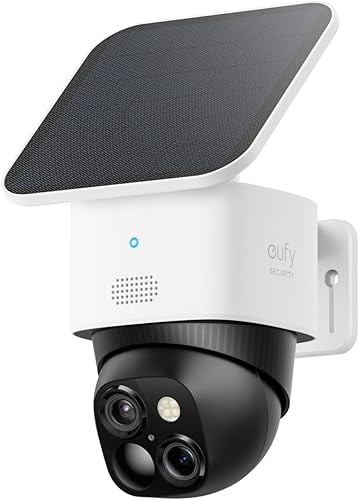
Install Anywhere, No Wall Outlet
The eufy SoloCam S340 ships with its solar panel in the box, records to built-in storage, and never needs a subscription to work. Pick this if you want a camera on a fence post or shed with no wiring involved.
See eufy SoloCam S340 →Camera and Smart Home Hub in One Body
The Aqara Camera Hub G5 Pro is the only one of these two with real HomeKit Secure Video support, and it quietly does double duty as a Zigbee and Thread border router for the rest of your Aqara sensors. Pick this if your home already leans Apple.
See Aqara Camera Hub G5 Pro →That's the short version. The longer version means untangling why one of these two cameras needs a permanent power source and the other doesn't, and what that trade-off actually buys you. Here's the rest of it, including a related look at how the eufy SoloCam S340 stacks up against the Reolink Argus 4 Pro if solar-powered cameras are your main interest.
Spec Head-to-Head
These two cameras solve the same problem (watching your driveway or backyard without paying a monthly fee) with almost opposite designs. One is a battery-and-solar camera. The other is a hub that happens to also be a camera.
| Feature | Aqara Camera Hub G5 Pro | eufy SoloCam S340 |
|---|---|---|
| Price range | $$$ | $$$ |
| Resolution | 4MP, true color night vision | 3K wide lens + 2K telephoto |
| Power source | Wired only, no battery option | Wire-free, solar panel included |
| Field of view coverage | Fixed lens | 360° motorized pan and tilt |
| Apple HomeKit Secure Video | Yes, native | No |
| Alexa / Google Home | Yes, via Matter bridge | Yes, native |
| Built-in smart home hub | Yes (Zigbee 3.0 + Thread border router) | No |
| Local storage without a subscription | Requires Apple Home Hub + iCloud+ for full HomeKit history | 8GB built in, no hub required |
| Extra detection categories | Person, on-device | Person free; vehicle, pet, and familiar-face via optional HomeBase S380 |
| Two-way audio | Yes | Yes |
Price tiers are approximate. $ = under $50, $$ = $50 to 150, $$$ = $150 to 300, $$$$ = over $300. Tap any link for the current Amazon price.
The pattern holds through the whole table. Aqara wins on ecosystem depth: it's the only one with true Apple HomeKit support and it works as a hub for other Aqara sensors. eufy wins on freedom of installation and total cost of ownership, since nothing about it requires a permanent power run.
Power and Installation
Winner: eufy, if wiring is the obstacle.
This is the trade Aqara made on purpose. Building a Zigbee 3.0 radio and a Thread border router into the same body as a camera means that body has to stay powered around the clock, so the Aqara Camera Hub G5 Pro has no battery mode at all. You run a cable to it, whether that's a standard power adapter or, on the separate PoE version, a single Ethernet run. For a garage, a covered porch, or anywhere already wired for a doorbell or floodlight, that's a non-issue. For a detached shed, a fence line, or a rental where you can't run new wiring, it rules the camera out entirely.
The eufy SoloCam S340 was designed around the opposite assumption. It ships with its solar panel in the box rather than as a separate purchase, mounts wherever gets a few hours of daylight, and needs nothing more than the included bracket and a couple of screws. For anyone who has ever tried to fish an outdoor-rated cable through a brick wall, the difference in install time alone is the whole decision.
If you're weighing HomeKit locks or plugs alongside a camera, our Apple HomeKit device roundup covers which categories still require a wired hub and which don't.
HomeKit, Alexa, and the Hub Question
Winner: Aqara, if you're Apple-first.
The Aqara Camera Hub G5 Pro supports HomeKit Secure Video natively. Clips land in the Apple Home app, motion triggers Home app automations directly, and recorded video counts against your iCloud+ storage tier the same way any other HomeKit camera does. It also happens to be a Zigbee 3.0 hub and a Thread border router in the same enclosure, so if you're already running Aqara sensors or plan to add Matter-over-Thread devices, this camera quietly becomes your home's hub instead of adding a separate one.
The eufy SoloCam S340 sits outside the Apple ecosystem. It works cleanly with Alexa and Google Home, including live view on an Echo Show or Nest Hub, but there is no HomeKit Secure Video path for it. If your household runs iPhones and you want camera history inside the Home app, eufy isn't an option here. For more on which cameras clear that bar, see our best HomeKit Secure Video camera guide.
Neither approach is wrong. It comes down to which ecosystem your other devices already live in. A household with an Apple TV 4K or HomePod mini already has the Home Hub infrastructure that makes Aqara's HomeKit integration worth the wired-power trade-off. A household on Alexa or Google Home gets no benefit from that integration and should default to eufy.
How Owners Rate the Two in Practice
One of these cameras has years of Amazon reviews behind it. The other is newer, so the feedback pool is thinner, but the themes that do show up track closely with the spec differences above.
eufy SoloCam S340: 4.3-star average from verified Amazon buyers
Owners consistently praise the included solar panel for keeping the battery topped off without any manual charging in most climates, and the pan-and-tilt motor for covering wide yards from a single mounting point. The most common complaint centers on the built-in 8GB storage filling up faster than expected on busy driveways, with several owners recommending the optional HomeBase S380 once event volume climbs. A smaller group notes that the two-lens dual-camera design produces noticeably larger files than a single-lens lens would, which is the direct cause of that storage pressure.
Aqara Camera Hub G5 Pro: early owner sentiment is positive but the sample is smaller
The Aqara Camera Hub G5 Pro is newer to market than the eufy SoloCam S340, so feedback on it is still early and we're not confident enough in a star average to report one. Owners who have written up hands-on impressions describe the HomeKit setup as unusually smooth for a hub-plus-camera device, and several highlight the value of getting a Thread border router without buying a separate accessory. The recurring caveat is the power requirement itself: buyers without an existing outdoor outlet near their mounting spot describe needing an electrician or a weatherproof extension run before installation, which is an extra step the eufy never requires.
Jacob’s read on this category
Treat the power question as the real fork in this decision, not resolution or price. A camera that also has to run a Zigbee and Thread radio around the clock cannot be a battery camera, full stop, so Aqara's wired-only design isn't a corner they cut, it's a direct consequence of the hub feature. If you don't need that hub and don't have easy access to power at the mounting spot, the eufy's solar panel removes an entire category of install headaches. If you do want one device to both watch the yard and extend your Thread mesh, the Aqara is doing a job that would otherwise take two separate purchases.
Which Camera Should You Choose?
Match the camera to your ecosystem and your mounting spot, in that order.
Frequently Asked Questions
Behind This Comparison
Aqara and eufy rarely get compared directly because they aren't really competing for the same install spot: one assumes you'll run power, the other assumes you won't. We pulled current listing details and pricing for both cameras, cross-checked the Aqara Camera Hub G5 Pro's power and hub specifications against its manufacturer listing and independent hands-on reviews, and confirmed the eufy SoloCam S340's storage and detection details against its existing verified track record on Amazon. Stock and pricing were re-checked against the live Amazon listings on 2026-09-29.
We do not take payment from Aqara, eufy, or any brand mentioned here. If you spot an error, please let us know.