Quick answer: buy the Wyze Cam v4 expecting Reolink-level detail and you'll get grainy infrared past 20 feet and a 14-day cloud window; that gap is exactly what the pricier Reolink Argus 4 Pro closes with 4K resolution, a 180-degree stitched view, and zero subscription required for full detection. Pick the Wyze for one doorway on a tight budget. Pick the Reolink to cover a full yard without ever paying a monthly fee.
Bottom Line
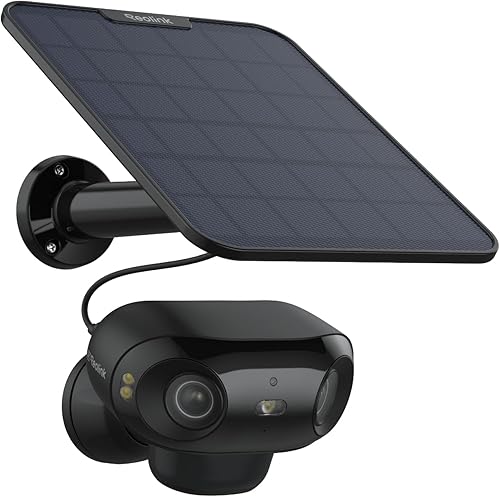
Video Quality & Subscription-Free Storage
4K resolution, a 180-degree stitched panoramic view from two lenses, and on-device detection that covers people, vehicles, and animals without a cloud plan. Battery-powered with an optional solar panel, so placement isn't limited by outlet access.
See Reolink Argus 4 Pro →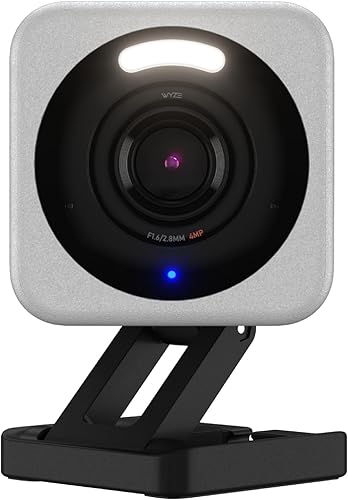
Price & Simplicity
2.5K video with a starlight sensor for low light, a built-in spotlight for color night footage up close, and a price tier a third the cost of the Reolink. Plugs into a standard outdoor outlet instead of running on battery.
See Wyze Cam v4 →That's the short version. The longer version means pulling apart resolution, night vision, power source, and storage cost, because the two cameras solve genuinely different problems.
Reolink vs Wyze: Full Spec Comparison
These two cameras aren't really competing for the same buyer. One is built to watch a whole property with no ongoing cost. The other is built to be cheap enough to put one on every door. Here's the full breakdown.
| Feature | Reolink Argus 4 Pro | Wyze Cam v4 |
|---|---|---|
| Price tier | $$$ | $ |
| Resolution | 4K UHD (180° stitched panorama) | 2.5K |
| Power source | Rechargeable battery, optional solar panel (sold separately) | Plug-in, continuous power required |
| Night vision | Full color, dual-lens | Color spotlight within roughly 15–20 ft, infrared beyond that range |
| Field of view | 180° horizontal, single stitched frame | Roughly 116° diagonal |
| Storage without a subscription | microSD up to 512GB or optional Reolink Home Hub | Free 14-day rolling cloud; microSD (sold separately) for continuous local recording |
| On-device detection | Person, vehicle, animal | Person, pet |
| Weatherproofing | Outdoor rated | IP65 outdoor rated |
| Voice assistant | Alexa, Google Home | Alexa, Google Home |
| Apple HomeKit | No | No |
Price tiers are approximate. $ = under $50, $$ = $50 to 150, $$$ = $150 to 300, $$$$ = over $300. Tap any link for the current Amazon price.
Line by line, the Reolink wins almost every spec. The one place it doesn't win is the one that matters most to a lot of buyers: price. The Wyze costs a fraction as much and still records, detects motion, and holds up outdoors.
Video Quality and Night Vision
Winner: Reolink, and the gap is easy to see.
The Reolink Argus 4 Pro stitches two 4mm lenses into a single 180-degree panoramic frame at 4K resolution. That means the entire width of a driveway or backyard lands in one continuous shot instead of a fixed narrow angle, and the extra resolution holds up when you crop in after the fact to check a face or a license plate.
The Wyze Cam v4 shoots 2.5K, which is still a real step up from the 1080p that used to define budget cameras, and its starlight sensor pulls in more usable detail in low light than a typical infrared-only sensor at this price. Where it falls behind is range: the built-in spotlight produces color night footage clearly within roughly 15 to 20 feet, but anything farther out reverts to standard infrared, meaning grayscale footage with less detail.
For a single entry point lit by a porch light, the Wyze holds up fine. For a driveway or side yard where the subject might be 30 or 40 feet out after dark, the Reolink's full-color night vision and wider single-frame view are the difference between a usable clip and a shape you can't identify.
Power, Mounting, and Storage Cost
Winner: depends on your setup.
This is the real dividing line between these two cameras, more than resolution. The Reolink Argus 4 Pro runs on a rechargeable battery, and an optional solar panel (sold separately) can keep it topped off indefinitely in a sunny spot, so you can mount it anywhere a screw or magnetic bracket reaches, no outlet required. The Wyze Cam v4 is a plug-in camera. It needs continuous power from a nearby outdoor outlet, which limits where you can put it but also means you're never swapping a battery or repositioning a solar panel to catch better sun.
On storage, both cameras avoid a required subscription, but they get there differently. The Reolink records to an inserted microSD card (up to 512GB) or an optional Reolink Home Hub, with full person, vehicle, and animal detection running on-device at no ongoing cost. The Wyze includes a free 14-day rolling cloud tier out of the box, which covers casual use, and adding a microSD card (sold separately) enables continuous local recording if 14 days of cloud history isn't enough. Neither camera locks its core detection behind a paid plan, which puts both ahead of subscription-first competitors like Arlo. Our guide to subscription-free security cameras covers more no-monthly-fee options if that's your main filter.
If you're weighing the Reolink specifically against another no-subscription pick rather than the Wyze, our eufy SoloCam S340 vs Reolink Argus 4 Pro breakdown goes deeper on that particular matchup.
How Owners Rate Each Camera
Spec sheets don't tell you how a camera behaves after six months outdoors. Here's the pattern across verified buyers for each one.
Reolink Argus 4 Pro: 3.8 stars from verified buyers
Owners consistently report that the 4K footage holds up well even after cropping in on a face or a plate, and that the optional solar panel keeps the battery topped off in most sunny mounting spots. The recurring complaint is app notification lag on weaker home WiFi, which tracks with any camera pushing 4K footage over a network. That 3.8-star average sits below the 4.2 bar we generally hold new picks to; it stays in this comparison because nothing else currently matches its 4K, 180-degree, no-subscription combination, and we re-check the rating every audit.
Wyze Cam v4: 4.4 stars from verified buyers
Value for the price is the theme that shows up most often, with the starlight low-light sensor repeatedly called out as unusually good for a camera in this price tier. The recurring gripe is that the free cloud tier's 14-day window feels short for anyone who travels for longer stretches, which is the same trade-off you're accepting anywhere a plug-in budget camera skips a subscription.
Jacob’s read on this matchup
Before buying either one, walk your mounting spot at night with a phone flashlight and note how far the light actually reaches. That distance is a rough proxy for where the Wyze's color spotlight gives out and infrared takes over; if your camera needs to watch anything past that point after dark, the Reolink's wider, full-color view earns its higher price. If the spot you're covering is small and well-lit already, like a covered porch or a single door, you're paying for range you won't use.
Which Camera Should You Buy?
Match the camera to the job, not the spec sheet.
Frequently Asked Questions
Behind This Comparison
Reolink and Wyze get compared constantly online, but most roundups treat "budget camera" as one category when these two are built around opposite priorities: one maximizes image quality and mounting flexibility, the other maximizes low price. We cross-checked resolution, field of view, power source, and storage against each manufacturer's current spec sheet, then walked the star-rating distribution on both ASINs so the review themes above reflect the broader buyer pool rather than a handful of outlier reviews. Pricing and listings were re-checked against the live Amazon pages on 2026-10-17. Specs come from Reolink's Argus 4 Pro page and Wyze's Cam v4 page, and the IP ratings follow the IEC 60529 standard.
We do not take payment from Reolink, Wyze, or any brand mentioned here. If you spot an error, please let us know.