Quick answer: if you want to keep your current deadbolt and exterior hardware, buy the August Smart Lock (3rd Gen) with Connect Wi-Fi Bridge; if you want a built-in keypad so guests never need an app, buy the Yale Assure Lock 2. Neither supports Apple Home Key.
Bottom Line
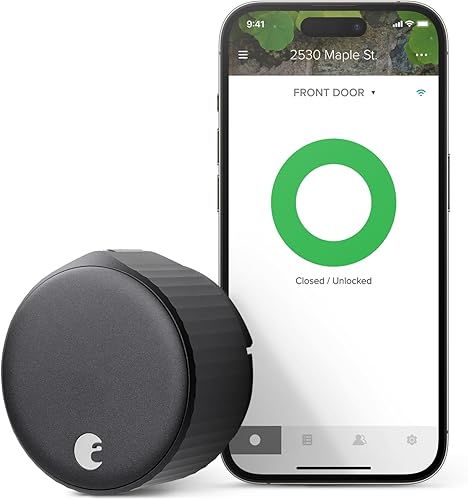
August Smart Lock (3rd Gen) with Connect Wi-Fi Bridge
Mounts over the deadbolt you already own, so the outside of your door never changes and your physical key still works. The Connect WiFi bridge comes in the box for remote access, and it answers to Alexa, Google, and HomeKit. The catch: no keypad, so every guest needs the August app.
See August Smart Lock →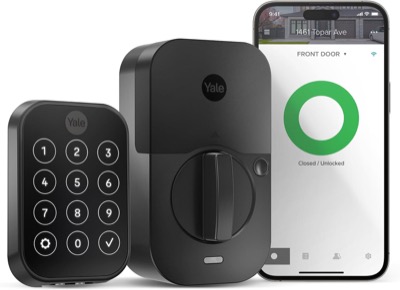
Yale Assure Lock 2
Replaces your whole deadbolt with a touchscreen keypad built in, so anyone can enter a code without downloading anything. Works with Alexa, Google, and HomeKit, with a separate Matter module available later. The catch: full removal of your current exterior hardware, and no Apple Home Key.
See Yale Assure Lock 2 →If you want to keep your existing deadbolt and touch the outside of your door as little as possible, buy the August. If you want a keypad built into the door so guests never need an app, buy the Yale. That two-sentence answer covers most buyers, but the guest-access gap between these two locks is bigger than the spec sheets let on, and it deserves its own section below.
August vs Yale: Head-to-Head
| Feature | August Smart Lock | Yale Assure Lock 2 |
|---|---|---|
| Price | $$$ | $$$ |
| Install type | Retrofit (interior only) | Full replacement |
| Keeps existing exterior hardware | Yes | No |
| Built-in keypad | No (app-based access) | Yes (touchscreen) |
| Connectivity | Bluetooth + WiFi (included Connect bridge) | WiFi + Bluetooth |
| Voice assistants | Alexa, Google, Siri | Alexa, Google, Siri |
| Apple HomeKit | Yes (via Connect bridge) | Yes (built-in Bluetooth) |
| Apple Home Key | No | No (Plus SKU only) |
| Matter support | No | Optional (separate module) |
| Auto-lock | Yes | Yes |
| Auto-unlock (GPS) | Yes | No |
| Battery type | AA, ~3-6 months | 4x AA, 6-12 months |
| Physical key backup | Yes (existing deadbolt key) | No (key-free) |
| Security grade | Inherits existing deadbolt grade | ANSI Grade 2 |
Price tiers are approximate. $ = under $50, $$ = $50 to 150, $$$ = $150 to 300, $$$$ = over $300. Tap any link for the current Amazon price.
August wins on installation speed and leaving your door alone. Yale wins on guest access, and its swappable-module design leaves room to add Matter later, which August cannot do at all. Neither one includes Apple Home Key, so if tap-to-unlock with an iPhone matters more than anything else, look at the Schlage Encode Plus instead.
Owner Reports After the Install
The August bundle currently averages a bit higher on Amazon than the Yale, but the complaints still cluster in different places, retrofit fit issues on one side and connectivity hiccups on the other.
August Smart Lock (3rd Gen) with Connect Wi-Fi Bridge: 4.4-star verified-buyer average
Owners who like the August tend to mention how invisible it is from the outside; the exterior hardware stays stock, so nothing advertises that a smart lock is on the door. The recurring complaint sits on the connectivity side: a minority of buyers describe setup taking several attempts before the Bluetooth link, the Connect bridge, and HomeKit all hold steady. That pattern points to a fussier initial pairing process rather than a hardware defect, but it is worth budgeting extra setup time and keeping the August app updated before you start.
Yale Assure Lock 2: 4.0 stars from verified buyers
The most-praised reviews come from HomeKit households who bought more than one unit and liked how the Yale Access app handled multiple locks at once. The most-cited complaint involves the touchscreen overheating in direct sun, with one owner reporting the keypad throwing errors and batteries draining in roughly a month under that condition. That is a north-facing-versus-south-facing-door issue more than a defect across the board, so check which way your door faces before you commit to a fully exposed touchscreen.
Jacob’s read on this category
The battery question is a small detail that becomes a real annoyance over a couple of years, and here both locks get it right: each runs on AA cells, the same batteries sitting in a kitchen junk drawer everywhere, so a low-battery alert is a two-minute fix. The difference worth noticing is where the WiFi radio lives. Yale builds it into the lock body; August offloads it to the wall-powered Connect bridge, so heavy remote use taxes an outlet, not the lock's batteries, and a misbehaving bridge only pauses remote access rather than the door itself.
Installation: Retrofit vs Full Replacement
Winner: August, for speed and disruption.
The August Smart Lock mounts on the interior side of your existing deadbolt. You remove your interior thumb-turn, attach the August mounting plate, and snap the lock body into place. Your exterior hardware, strike plate, and physical key never change. Most first-timers finish in about 10 minutes, and August includes an adapter kit to fit common deadbolt styles. This is why the August shows up constantly in renter-friendly and Airbnb-turnover guides: nothing about the door's appearance changes, and it comes off just as easily when you move out. The only extra step is plugging the included Connect bridge into an outlet near the door so remote access works.
The Yale Assure Lock 2 is a full replacement. You pull the entire existing deadbolt, interior and exterior, and drop the Yale hardware into the same bore holes. Installation runs 15 to 30 minutes with a screwdriver and the included instructions, and it is still a DIY-friendly job, just a bigger one than the August. The upside is a completely new, key-free exterior with a keypad already attached; there is nothing extra to buy or bolt on afterward.
If you rent, or if you just don't want to touch what's currently on the outside of your door, August is the lower-friction choice. If you're an owner who wants the keypad included from day one, the extra 10 to 20 minutes of Yale's installation buys you hardware August doesn't have.
Guest Access: The Gap the Spec Sheets Miss
Winner: Yale, and it's not close.
This is the single biggest practical difference between these two locks, and it rarely gets top billing in spec comparisons. The Yale Assure Lock 2 has a built-in touchscreen keypad. Hand someone a four-digit code and they walk in, no app, no account, no smartphone required. That matters for house cleaners, dog walkers, contractors, in-laws who don't want another app, and short-term rental guests who need reliable self check-in.
The August Smart Lock has no keypad at all. Every guest gets access through the August app, which means they need to download the app, create an account, and accept an invitation before the door will open for them. For a tech-savvy houseguest, that's a minor speed bump. For an Airbnb guest arriving after a long flight, or a cleaner who just wants to get the job done, it's real friction, and it's the reason August markets an optional standalone keypad accessory as an add-on purchase rather than including one.
If your household regularly hands access to people who don't want to install an app, the built-in keypad makes the Yale worth the more invasive installation. If it's just you and people already comfortable with smartphone apps, August's app-only approach is a non-issue.
Smart Home Ecosystem and Home Key
Winner: Yale, narrowly, for the keypad and a Matter upgrade path.
Both locks work with Alexa and Google Assistant, and both add Apple HomeKit out of the box, the August through its Connect bridge and the Yale over the Bluetooth radio built into every Assure Lock 2. Neither one supports Apple Home Key tap-to-unlock; that feature sits behind pricier locks like the Schlage Encode Plus or the separate Yale Assure Lock 2 Plus, not the standard Yale Assure Lock 2 covered here.
The differentiator is Matter, the cross-platform smart home standard backed by Apple, Google, Amazon, and Samsung. The Yale Assure Lock 2 uses interchangeable smart modules, so you can move it to Matter later by adding Yale's separate Matter module. The Wi-Fi version linked here ships with the Wi-Fi module, not Matter, and the lock holds one module at a time, so adding Matter means swapping the Wi-Fi module out rather than running both. The August Smart Lock has no module slot and no Matter path, so it stays tied to its native Alexa, Google, and HomeKit integrations.
August adds one feature Yale doesn't have: GPS-based auto-unlock, which pops the deadbolt as your phone detects you walking up to the house. It's a genuinely convenient touch if you're usually carrying groceries or a dog leash and don't want to fumble for a code or a phone unlock.
Which Lock Should You Buy?
Stop asking which lock is "better" overall. Ask which trade-off you can live with.
Frequently Asked Questions
How We Compared These Two Locks
August and Yale get compared constantly as "the two easy DIY locks," but they solve different problems: one preserves your existing hardware, the other replaces it with a keypad built in. We cross-checked current specs for both against manufacturer product pages, confirmed WiFi and Home Key support against the exact ASINs linked in this article rather than the wider product family, and read through the star-rating distribution on each listing to make sure the complaint themes above reflect the broader buyer pool rather than a single outlier review. Pricing and specs were verified against live Amazon listings on 2026-10-17. August's retrofit fit and Connect bridge details were taken from August's Smart Lock + Connect page, and the deadbolt grade language follows the ANSI/BHMA ratings published by the Builders Hardware Manufacturers Association. Readers weighing a retrofit against a Matter lock should also read Level Lock Pro vs August, which keeps the August as the retrofit benchmark.
We do not take payment from August, Yale, or any brand mentioned here. If you spot an error, please let us know.
Prices and availability reflect Amazon listings at time of writing. Confirm on the product page before purchase.