Quick answer: the sharpest difference between these two is what your door looks like afterward. The Level Lock Pro pulls the old deadbolt out and leaves a keyway with no visible electronics, and it is the only one of the pair with Apple Home Key. The August Smart Lock with Connect keeps your existing exterior cylinder and every key already cut for it, which also makes it the one a landlord is likely to approve.
Two Locks, Two Different Doors
Level Lock Pro
Everything electronic lives inside the bolt, so from the porch this reads as a plain deadbolt with a keyway. It carries Apple Home Key, so an iPhone or Apple Watch opens the door with a tap and no app launch, and it speaks Matter over Thread for the rest of your smart home. The catch is that it replaces your hardware outright, and it has no Wi-Fi radio of its own.
See Level Lock Pro →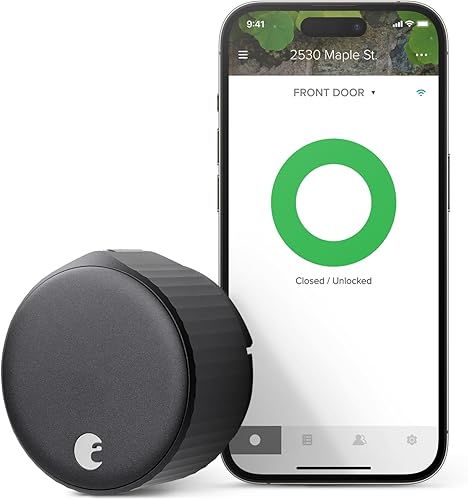
August Smart Lock with Connect
This one clamps over the interior thumbturn and never touches the outside of the door, so the keys your neighbour, your cleaner and your landlord already hold keep working. The bundle includes the plug-in Connect bridge for Wi-Fi, HomeKit, Alexa and Google, plus a door-position sensor. No Apple Home Key, and nothing to press on the door itself.
See August Smart Lock →Neither lock has a keypad, which is the single fact that decides this matchup for a lot of households. If somebody at your door needs to type a code, both of these are the wrong category and a keypad deadbolt from our smart lock roundup is the better starting point. Everything below assumes phones, keys and fobs are enough.
Feature Grid: Pro vs 3rd Gen
The rows that move a buying decision are install type, who can still use an old key, and how the lock gets to the internet. The rest is detail.
| Feature | Level Lock Pro | August Smart Lock + Connect |
|---|---|---|
| Price tier | $$$$ | $$$ |
| Install type | Full deadbolt replacement | Retrofit, interior side only |
| Keeps existing keys working | No, a new keyway ships with the lock | Yes, exterior cylinder untouched |
| Exterior appearance | Keyway only, no visible electronics | Whatever is on your door now |
| Keypad codes | Keypad sold separately as an accessory | No keypad; access is by app or key |
| Fingerprint reader | None | None |
| Phone unlock | Apple Home Key, touch-to-unlock, app | App, auto-unlock on arrival |
| Apple HomeKit | Yes | Yes, through the included Connect bridge |
| Apple Home Key | Yes | No |
| Matter | Yes, Matter over Thread | No |
| Alexa and Google | Through a Matter controller | Yes, through the Connect bridge |
| Away-from-home access | Thread border router or Matter hub you supply, or Level Connect sold separately | Plug-in Connect bridge included |
| Wi-Fi radio in the lock | None | None; Wi-Fi comes from the bridge |
| Door position sensing | Built into the lock | DoorSense sensor included |
| Extra credentials in the box | Two NFC key fobs | Your existing keys |
| Battery | One CR2 lithium cell | AA cells |
| Physical key backup | Yes, with the supplied keyway | Yes, your current deadbolt key |
| Bolt and security rating | BHMA AAA, ANSI Grade 1 bolt | Inherits your existing deadbolt's grade |
| Link | Check price | Check price |
Price tiers are approximate. $ = under $50, $$ = $50 to 150, $$$ = $150 to 300, $$$$ = over $300. Tap any link for the current Amazon price.
What Stays on Your Door, and What Comes Off
Winner: August, by a wide margin, if the door is not yours.
The August is a retrofit. The exterior cylinder, the strike, the bolt and the keys all stay exactly as they are, and the smart half mounts over the interior thumbturn. That has three consequences worth more than any feature cell: a renter can usually install it without asking, nobody loses key access during the swap, and taking it off when you move is a ten-minute job that leaves the door the way you found it.
Two install details decide whether that goes smoothly. First, interior clearance: the August body is tall, and a door with a narrow trim reveal, a storm door, or a deep inside pull can crowd it. Measure before you order. Second, the deadbolt's thumbturn has to match one of the included adapters, which covers common residential hardware but not everything, and a worn or stiff deadbolt will defeat the motor. If your bolt needs a shoulder to turn the key, fix the alignment first; a retrofit lock inherits every mechanical problem your existing deadbolt has, and that is the most common cause of a motor that stalls halfway.
The Level Lock Pro goes the other way: the whole deadbolt comes out and Level's own hardware goes in, electronics and battery hidden inside the bolt body. You get a cleaner door than any other smart lock on the market, at the cost of a reversible install and your old keys. Because the bolt itself is new, the ANSI Grade 1 rating is the lock's own rather than inherited, which is the quiet upside of replacing hardware instead of covering it.
Unlocking: Phone, Tap, or Your Old Brass Key
Winner: Level, if the household is on iPhones.
Apple Home Key is the real separation here. On the Level Lock Pro you hold an iPhone or Apple Watch near the lock and the door opens, with no app to launch and no network needed; it keeps working when your Wi-Fi is down and when your phone's battery is in reserve power. August has HomeKit through its bridge, which puts the lock in the Apple Home app and gives you Siri, but tapping the lock with a phone is not part of that. If the Apple Home app is where your house already lives, our roundup of HomeKit smart locks covers how the two features differ in practice.
August's counter is auto-unlock, which uses your phone's location and the door-position sensor to unlock as you walk up. When it works it is the most pleasant entry method of the two, and when it misfires, which it does for some owners on long driveways or in apartment hallways, it is the feature they turn off first. The fix that usually works is tightening the geofence and keeping the sensor magnet properly aligned.
For the people in your house without a phone, Level ships two NFC fobs that open the door with a tap, which is a genuinely useful answer for kids and for anyone wearing gloves. August's answer to the same problem is the key already in their pocket. Both are better than nothing; neither is a code on a keypad. We walk through the same keypad-versus-no-keypad trade-off against a fingerprint lock in our Level Lock Pro versus Ultraloq U-Bolt Pro matchup.
Getting to the Internet: Thread and Matter vs an Included Bridge
Winner: August for buy-it-and-be-done, Level if you already run Thread.
Neither lock has a Wi-Fi radio inside it, and that is not a flaw; a Wi-Fi chip on a battery-powered deadbolt is why some locks eat cells. The difference is what you supply to close the gap.
August closes it for you. The Connect bridge is in the box, it plugs into an outlet near the door, and once it is on your 2.4GHz network you get remote lock and unlock, activity history, HomeKit, Alexa and Google. One more thing on a shelf, but no decisions.
Level expects you to already have a Thread border router or a Matter hub: a recent HomePod, an Apple TV, or an equivalent Matter controller. If you do, this is the better architecture, because Thread is low-power and mesh-routed and the lock becomes a native device in Apple Home or any Matter app. If you do not, remote access means buying Level Connect separately, and the total creeps well past what the comparison table's tiers suggest. Check which hubs you own before you choose this one; that single check is where most of the disappointment with Level purchases comes from.
What Shows Up After a Few Months of Use
Owner reporting on retrofit August locks clusters on mechanical fit rather than software. The recurring themes: locks that work perfectly on a well-aligned door and stall on a sticky one, batteries that go faster than expected when auto-unlock is doing a lot of work, and the bridge needing a power-cycle after a router change. Owners who installed on a newer deadbolt and left auto-unlock off generally report it quietly working for years. Supply on the 3rd-generation bundle has been uneven, so confirm the current offer and what is in the box on the listing before committing.
For Level, the praise is consistent and specific: people like that visitors cannot tell the door is smart, and Home Key gets described as the first phone unlock that feels faster than a key. The complaints are equally specific. The CR2 cell is not a battery most households stock, so a dead lock means a trip to the store rather than a drawer. Owners also report the app and Bluetooth pairing being fussier than the hardware deserves, and anyone who bought it expecting remote access out of the box without a Thread or Matter hub is disappointed by design, not by defect.
One longevity note that applies to both: a retrofit or a hidden-electronics lock is harder to service than a conventional keypad deadbolt. When these fail, the usual path is a replacement unit rather than a repair, so weigh the warranty terms as part of the price.
Which One Belongs on Your Door
Questions People Ask Before Buying
How This Matchup Came Together
These two locks get compared because they are the two best-known app-first deadbolts with no keypad, and because buyers often shortlist them without noticing that one is a retrofit and the other is a replacement. We built the grid from each manufacturer's published specification for the exact model linked above, held every capability claim to the specific SKU rather than the brand, and left a cell reading as inherited or unlisted where the source did not state a figure. Owner themes were read in aggregate for recurring patterns, not individual anecdotes, and we do not quote customer review text. Specs were re-checked on 2026-10-17. Specs come from Level's Lock Pro page and August's Smart Lock + Connect page, and the Matter-over-Thread claim from the CSA product database.
We do not take payment from Level, August, or any brand mentioned here. If you spot an error, please let us know.
Prices and availability reflect Amazon listings at time of writing. Confirm on the product page before purchase.