Quick answer: a starter smart home needs three anchors: the Amazon Echo Show 8 (newest model) as the speaker or display, the Ecobee Premium as the thermostat, and the August Smart Lock (3rd Gen) with Connect Wi-Fi Bridge at the door, with the full comparison below.
A "smart home" sounds complicated. It's not. Strip it down and a smart home is just a house where you can control devices with your voice or phone, and where those devices can talk to each other. Your thermostat lowers the heat when you leave. Your porch light turns on at sunset. Your front door locks itself at 10 PM. That's the whole thing.
The problem isn't the technology. The problem is the 200 articles telling you to buy 15 things at once without explaining why or in what order. This guide is different. We're going to walk through the exact decisions you need to make, in the exact order you need to make them, with specific product picks and real prices. No vague advice. No "it depends" hand-waving.
By the end of this page you'll know which ecosystem to pick, which five devices to buy first, how to start on a tight budget, and how to build out your smart home over a year without wasting money on things that don't work together.
Choose Your Ecosystem First
This is the single most important decision you will make, and you need to make it before buying anything. Your ecosystem is the platform that connects all your devices and lets them work together. Pick the wrong one and you'll end up with six apps on your phone, devices that can't talk to each other, and routines that never quite work right.
Four ecosystems matter in 2026:
Amazon Alexa
Best for: most people. Alexa has the widest device compatibility of any ecosystem. Over 300,000 devices work with Alexa as of early 2026. The Echo speaker lineup is cheap (the Echo Pop is the entry point), voice recognition is reliable, and nearly every smart home brand prioritizes Alexa compatibility first. If you're starting from zero and have no strong preference, start here.
Key strengths: widest compatibility, cheap hardware, strong routines, works with Ring and Blink natively, deep third-party support. Key weakness: Amazon collects significant usage data, and some features require an Alexa subscription.
Apple HomeKit
Best for: Apple households. If everyone in your home uses iPhones and you own an Apple TV or HomePod, HomeKit just works. Siri integration, Apple Home app on every device, and strong privacy (processing happens on-device, not in the cloud). The downside is fewer compatible devices, and they tend to cost more. A HomeKit-compatible smart plug typically costs noticeably more than an Alexa-only equivalent.
Key strengths: best privacy, tight Apple device integration, HomeKit Secure Video is excellent. Key weakness: smaller device selection, higher prices, Siri is less capable than Alexa for smart home control.
Google Home
Best for: Pixel and Nest product owners. Google Home has gotten much better, and the Google Home app redesign in 2024-2025 made it genuinely usable. If you already own a Pixel phone, Nest thermostat, or Nest speakers, Google Home ties them together well. Google Assistant is the smartest voice assistant for answering questions. Its smart home device library is smaller than Alexa's, though.
Key strengths: best voice assistant intelligence, strong Nest integration, solid automations. Key weakness: Google has a habit of killing products and services, compatibility library is smaller than Alexa's.
Matter (the new universal standard)
Matter isn't really an ecosystem in the traditional sense. It's an open standard that lets devices work across all ecosystems. A Matter-compatible smart plug works with Alexa, Google, and HomeKit at the same time. We cover Matter in detail below. For now, the key point is this: buying Matter-compatible devices future-proofs your investment, because you can switch ecosystems later without replacing hardware.
Our recommendation
Alexa for most people. The device compatibility gap is still real. If you're starting from scratch with no Apple ecosystem investment, Alexa gives you the most options at the lowest prices. All-Apple household? Go HomeKit and don't look back. Already own Nest products? Google Home makes sense. Whatever you pick, commit to it. Mixing ecosystems is the number one mistake beginners make, and we cover why below.
The 5 Devices to Start With
You don't need to buy all five at once. This is the priority order based on daily impact, ease of setup, and how much each device improves life from day one. Buy device one. Live with it for a week. Add the next when you're ready.
Amazon Echo Show 8 (newest model)
A smart speaker is the brain of your smart home. Without one, you're just opening apps on your phone, which is barely better than walking to the thermostat. A smart display like the Echo Show 8 adds a screen, which means you can view camera feeds, see who is at the door, glance at the weather, and follow recipes without touching your phone.
Why the Echo Show 8 specifically: it's the right size (8.7-inch screen fits on a kitchen counter without dominating it), the speaker quality is genuinely good for a smart display, and it supports video calling. It undercuts the Google Nest Hub Max while doing roughly the same job. If you chose the Apple ecosystem, the HomePod (2nd gen) or HomePod Mini are your options, but you lose the screen.
Ecobee Premium
A smart thermostat is the only smart home device that saves you money. The Ecobee Premium cuts heating and cooling costs by up to 23% according to ecobee. At average energy prices, that works out to $100-180 per year in savings. The thermostat pays for itself within 18 months and keeps saving every year after that.
Why the Ecobee Premium: it has a built-in Alexa speaker (doubles as a smart speaker in whichever room it lives), a room sensor is included for balancing temperatures across rooms, it works with Alexa, Google, and HomeKit (rare for a thermostat), and the air quality monitoring is a nice bonus. The Nest Learning Thermostat is comparable if you're in the Google ecosystem, and the Amazon Smart Thermostat is a solid budget pick we cover in the budget section.
See our full comparison: Best Smart Thermostats (2026)
View Ecobee Premium on Amazon →
August Smart Lock (3rd Gen) with Connect Wi-Fi Bridge
A smart lock kills the "did I lock the door?" anxiety permanently. It locks automatically when you leave, unlocks when you arrive (using your phone's location), and lets you grant temporary access codes to guests, dog walkers, or contractors without giving out physical keys. It's one of those devices that, once you live with it, you can't believe you went without.
Why the August: it installs over your existing deadbolt in about 15 minutes (you keep your physical keys as backup), the Connect Wi-Fi bridge in the box plugs into a nearby outlet for remote access, it works with Alexa, Google, and HomeKit, and the auto-lock/auto-unlock is reliable. The Yale Assure Lock 2 is another solid option if you want a keypad on the outside.
See our full comparison: Best Smart Locks (2026)
View August Smart Lock on Amazon →
Wyze Cam v4
You don't need to spend a fortune on your first security camera. The Wyze Cam v4 shoots 2.5K video, has a starlight sensor for strong low-light footage, detects people and pets, and includes a free cloud storage tier. At its low price, the value is absurd. Cameras that cost five times more don't deliver five times the image quality.
Start with one camera covering your main entry point (front door or back door). Once you see how useful it is, you can add more. If you want a camera with zero subscription, the Reolink Argus 4 Pro shoots 4K with fully local storage. If you're an Apple household, the Eve Outdoor Cam works natively with HomeKit Secure Video.
See our full comparison: Best Security Cameras (2026) | Also: Cameras Without Subscriptions
Ring Battery Doorbell Plus
A video doorbell lets you see who's at your door from anywhere. The couch, the office, another country. Package theft drops dramatically when delivery drivers see a camera, and you can talk to visitors without opening the door. The battery-powered Ring installs in 10 minutes with no wiring required.
Why the Ring Battery Doorbell Plus: 1080p HDR video (you can see packages on the ground, not just faces), reliable motion detection, and tight integration with the Echo Show 8 (say "Alexa, show me the front door" and the live feed appears). It does require a Ring Protect subscription ($4.99/month) to save video clips, which is its main drawback. If you want no subscription, the Reolink Doorbell WiFi records locally to a microSD card.
See our full comparison: Best Video Doorbells (2026)
What Is Matter and Why Should You Care?
Matter is a connectivity standard developed by Apple, Amazon, Google, and Samsung (among others) through the Connectivity Standards Alliance. It launched in late 2022 and has been steadily picking up adoption since. Here's why it matters for your buying decisions right now.
The problem Matter solves: before Matter, every smart home device spoke a different language. A Philips Hue bulb worked with Alexa and HomeKit but needed its own bridge. A Nest thermostat only worked with Google Home. If you switched from Alexa to HomeKit, half your devices turned into paperweights. Matter fixes that by giving all devices a common language.
What Matter means for you in 2026: when you buy a Matter-compatible device, it works with Alexa, Google Home, HomeKit, and Samsung SmartThings out of the box. No worrying about compatibility. No checking labels. If it says "Matter" on the box, it works with everything. This is especially valuable if you're not sure which ecosystem you'll stick with long-term.
The current reality: Matter is available on smart plugs, light bulbs, switches, locks, thermostats, and some sensors. Camera and doorbell support is still rolling out in 2026 and is not yet widespread. The standard is genuinely useful today for basic devices, but it hasn't replaced ecosystem-specific functionality for advanced features like camera AI detection or complex automation routines.
Our practical advice: when you're choosing between two similar devices and one supports Matter, buy the Matter one. But don't pay a huge premium for Matter support, and don't skip an excellent device just because it lacks it. The ecosystem you chose in step one still matters more than Matter compatibility for now. That'll change over the next two to three years as the standard matures.
Smart Home on a Budget: Start Small
You don't need to spend a small fortune to have a smart home. Here's a functional starter kit that stays cheap:
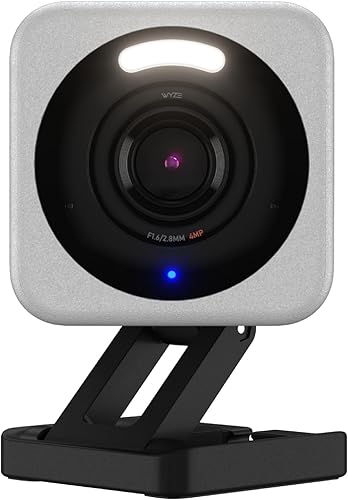
Wyze Cam v4
2.5K security camera with free cloud storage tier and microSD support. Covers your most vulnerable entry point. See our full camera comparison.
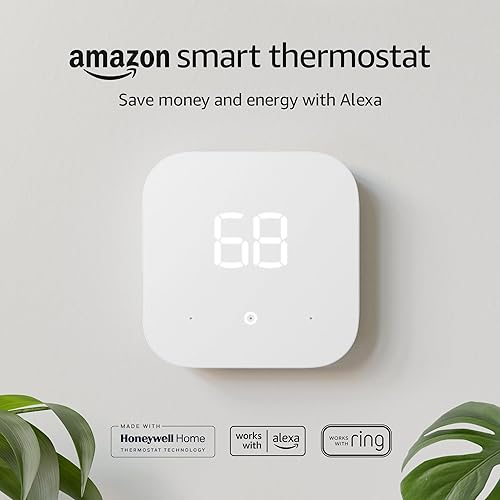
Amazon Smart Thermostat
Basic smart thermostat that works with Alexa. No room sensors or air quality monitoring, but it schedules, responds to voice commands, and saves on energy bills. Pays for itself within a year.
Smart Plug (TP-Link Kasa or Amazon)
Turns any "dumb" lamp or appliance into a smart device. Set schedules, control by voice, or trigger with routines. The gateway device that shows you what smart home living actually feels like.
Total: a modest sum for all three. The Amazon Smart Thermostat frequently drops during sales, which trims the total further. And you'll likely save the difference on your first energy bill.
This trio gives you security monitoring, energy savings, and basic automation. It's not a toy setup. It's a real smart home foundation. Add a smart speaker when the budget allows (an Echo Pop is the cheapest way in) and expand from there using the build-out timeline below.
If even that is a stretch, start with just the smart plug, the cheapest device of the three. Plug a living room lamp into it, set a sunset schedule, and control it with the free Alexa or Google Home app. That single device shows you how the whole system works and whether you want to invest further.
Common Mistakes Beginners Make
We see the same errors over and over in smart home forums and product reviews. Avoid these and you'll save hundreds of dollars and a lot of frustration.
1. Mixing ecosystems without a plan
Buying a Ring doorbell (Alexa-only), a Nest thermostat (Google-only), and an Eve camera (HomeKit-only) means three separate apps, three separate automation systems, and zero communication between devices. Your doorbell can't trigger your camera. Your thermostat can't respond to your door locking. Pick one ecosystem as described above and buy devices that work with it. The Matter standard is making cross-platform easier, but we're not there yet for all device categories.
2. Buying devices before choosing a hub or ecosystem
The impulse buy at Best Buy or the lightning deal on Amazon is how most people start their smart home. It's almost always a mistake. That cheap smart bulb you grabbed might only work with Zigbee (which needs a hub you don't own) or only with an ecosystem you didn't choose. Always check compatibility before purchasing. Read the "Works With" section on the product page.
3. Ignoring WiFi requirements
Smart home devices are WiFi-hungry. Each one connects to your router individually. A household with 15-20 smart devices plus phones, tablets, laptops, and streaming sticks can easily overwhelm a basic ISP-provided router. Signs of WiFi overload: devices randomly going "offline," slow response to voice commands, cameras buffering during live view.
The fix: if you plan to add more than 10 smart devices, invest in a mesh WiFi system (Eero, Google WiFi, or TP-Link Deco). A two-pack that covers a typical home is a reasonable investment. This isn't optional if you're serious about smart home. It's infrastructure, like having enough electrical outlets.
4. Overlooking subscription costs
An $80 camera with a $5/month subscription costs $260 over three years. A doorbell with a $5/month plan adds up the same way. Multiply by three or four devices and you're paying $20+/month on subscriptions you didn't budget for. Always check whether a device requires a subscription for core features. Our camera comparison and doorbell comparison call out subscription costs for every model.
5. Automating too much, too fast
It's tempting to set up 20 automations on day one. Don't. Start with one or two routines (a "good morning" routine that turns on lights and reads the weather, a "goodnight" routine that locks the door and turns off lights). Live with them for a week. Fix what annoys you. Then add more. Complex automations that fire incorrectly are worse than no automation at all. Nothing erodes household buy-in faster than lights randomly turning off during dinner.
Building Out Over Time: A 12-Month Plan
You don't need to buy everything at once. Here's a practical, budget-friendly timeline that builds your smart home in logical phases. Each phase builds on the last, so everything works together by the end of the year.
Month 1-3: The Basics
Goal: Voice control, energy savings, and basic convenience.
Month 3-6: Security
Goal: Know what is happening at your home, whether you are there or not.
Month 6-12: Automation and Expansion
Goal: Your home starts thinking for itself.
Total 12-month investment: a manageable amount depending on your choices, spread over a year. Broken down monthly, it can run less than many streaming subscriptions combined. And unlike streaming, your smart thermostat is actively paying you back every month.
Frequently Asked Questions
What First-Year Owners Wish They Had Known
Reading through verified-buyer reviews and the weekly regret threads on /r/homeautomation, the same first-year lessons come up again and again. Returns rarely happen because a device is bad. They happen because it landed in the wrong house: a HomeKit-only gadget in an Alexa home, a camera whose core features turned out to sit behind a subscription, or a bulb bought before anyone checked the "Works With" box on the listing. The other recurring theme is WiFi. Owners report plenty of "defective" devices that were really router-placement problems, especially cameras at the far end of the house.
Jacob's read for beginners
The most expensive beginner mistake is buying devices before picking an ecosystem, and the cheapest insurance is boring infrastructure. Decide where your household already lives (iPhone points to HomeKit, Echo to Alexa, Android plus Nest to Google) and let that veto every purchase, including the lightning deals. Then start smaller than feels exciting: one smart plug on a living room lamp proves the whole concept for the price of a takeout meal. If it runs for a month without babysitting, work through the 12-month plan above. And before you add device number ten, budget for mesh WiFi. Skipping it is how a smart home turns into a house full of offline icons.
How This Starter List Came Together
This guide reflects what the author would recommend to someone starting from zero in 2026. The device picks come from comparing every Amazon best-seller in each category (doorbells, cameras, plugs, lights, locks, thermostats) against the published manufacturer specs and the top-helpful verified reviews. We then dropped anything whose complaints concentrated around a single repeatable problem (battery drain, app outages, firmware bricking) rather than one-off user error. Prices were re-checked against the live Amazon listings on 2026-10-17, and the monthly subscription math uses each brand's current published tiers, not promotional pricing. Matter and Thread claims were checked against the CSA Matter product database and the Thread Group's overview. Once the basics are in, the usual next steps are a smart garage opener, motorized blinds, or a DIY alarm kit, each of which has its own guide here.
We do not take payment from any manufacturer. If you spot an error, please let us know.