Quick answer: the Ecobee Smart Thermostat Premium wins this matchup on native HomeKit, built-in Alexa, and a room sensor included in the box; choose the Nest Learning Thermostat (4th Gen) only if yours is a Google Home household that wants zero-setup auto-scheduling.
Bottom Line
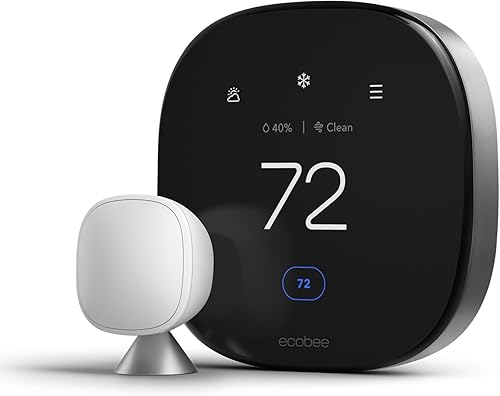
Ecosystem Reach & Included Hardware
Native local HomeKit control, a built-in Alexa speaker, Google Home support, an included SmartSensor for a second room, and a built-in air quality monitor. If you run more than one smart home platform, or any Apple devices, Ecobee is the easier fit.
See Ecobee Premium →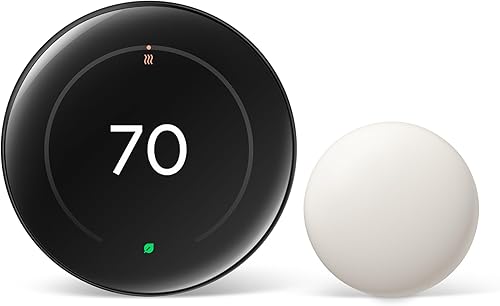
Learning Algorithm & Google Home
Watches your manual adjustments for a week or two and builds a schedule with no app configuration required. Pair that with the OLED Farsight display and it's the more polished pick for an all-Google household that doesn't care about HomeKit.
See Nest Learning →Buy the Nest expecting full Apple Home control and you'll find a thermostat icon that adjusts temperature and mode and not much else, because Nest's HomeKit reach runs entirely through Matter's bare-bones bridge. That single gap decides this comparison for a lot of buyers before any other spec matters. Here's the full breakdown.
Spec Head-to-Head
Both thermostats are well reviewed, both save real money on heating and cooling, and both skip a required subscription. The differences that actually change daily use are ecosystem depth, included hardware, and how each one gets you a schedule.
| Feature | Ecobee Premium | Nest Learning (4th Gen) |
|---|---|---|
| Price | $$$ | $$$ |
| Apple HomeKit | Native, local control, no hub required | No native support; basic control only via Matter |
| Matter certified | Not required (native HomeKit already built in) | Yes |
| Built-in voice assistant | Built-in mic/speaker functions as an Alexa device | No built-in mic or speaker |
| Voice ecosystems supported | Siri, Alexa, Google Assistant, SmartThings | Google Assistant primary; limited Alexa |
| Room sensor included | Yes, one SmartSensor (temperature + occupancy) | Yes, one Nest Temperature Sensor (temperature only) |
| Air quality monitoring | Built-in VOC, CO2, and humidity monitor | Not available |
| Display | Color touchscreen | OLED Farsight, lights up on approach |
| Auto-scheduling | Smart Home/Away via SmartSensor, initial setup required | Learns your routine automatically, no manual setup |
| Subscription required | No | No |
Price tiers are approximate. $ = under $50, $$ = $50 to 150, $$$ = $150 to 300, $$$$ = over $300. Tap any link for the current Amazon price.
The pattern holds across almost every row. Ecobee wins on ecosystem breadth and included hardware. Nest wins on the two things it was originally built around: a learning algorithm that removes setup work, and a display that looks better on a wall. Neither thermostat is a bad buy. They're built for different households.
Owner Reports After a Full Season
Both thermostats have long track records at this point, and the feedback pattern for each is consistent across install videos, forum threads, and Amazon reviews.
Ecobee Smart Thermostat Premium
Owners switching from older Ecobee models and from Nest consistently describe the Premium as the most capable thermostat they've owned, with several people specifically comparing it favorably against a previous Honeywell or Nest unit. Installation is repeatedly called straightforward as long as the home has a C-wire, with the app walking through the process step by step. The two recurring complaints are the built-in air quality sensor, which some owners feel mostly reports clean air without much useful detail, and the scheduling interface, where setting time and temperature as separate steps reads as more tedious than it needs to be.
Nest Learning Thermostat (4th Gen)
Owners consistently praise how little setup the Nest requires, describing the auto-schedule as accurate within the first couple of weeks and rarely needing correction after that. The Farsight display draws frequent compliments for looking like an actual piece of home decor rather than a utility device. The most common frustration among buyers who also use Apple devices is discovering, often after purchase, that HomeKit support is limited to Matter's basic controls, missing the fan and preset options they expected from a native integration.
Jacob’s read on this category
Check your smart home platform before you check the price. If you own any Apple hardware, and especially if you already run HomeKit automations, the Nest's Matter bridge will feel like a downgrade the first time you try to change the fan mode from your phone and can't. The sensor situation is the other detail people misread: both of these listings ship with a room sensor in the box, so the real difference isn't what's included, it's what the sensor does. Ecobee's SmartSensor detects occupancy and feeds the home-and-away logic, while Nest's bundled Temperature Sensor only reports temperature. Buy on sensor capability, not on the packing list.
Apple HomeKit and Matter, in Practice
Winner: Ecobee, and it's not close for Apple households.
Ecobee built native HomeKit support directly into the thermostat's firmware years before Matter existed, and that integration still runs locally: control from the Home app, automations, and Siri commands all work without a cloud round trip, and the thermostat can be paired straight from its own touchscreen without opening the Ecobee app at all.
Nest has no equivalent native path. The only way a Nest Learning Thermostat reaches Apple Home is through Matter, and Matter's current bridge only exposes temperature adjustments and mode changes. Fan control, temperature presets, and remote sensor readings, all things Ecobee exposes natively in HomeKit, simply don't come through on the Nest side. If HomeKit is a real requirement rather than a nice-to-have, that gap is decisive.
Matter itself cuts the other way. Nest is Matter-certified, which matters for interoperability with non-Apple, non-Google platforms like Home Assistant and SmartThings. Ecobee doesn't need Matter to reach HomeKit, since its native integration already covers that, but Matter certification still broadens which third-party hubs can talk to a device out of the box. For a household that's deep in Home Assistant specifically, check both product listings for current Matter status before buying, since certification support can change between hardware revisions.
Auto-Scheduling vs Sensor-Driven Comfort
Winner: depends on how hands-off you want the first month to be.
Nest's original claim to fame is the algorithm the brand is named after. Turn the dial manually for the first week or two and the thermostat quietly builds a schedule that matches your actual habits, no app required. For a household that wants to install a thermostat once and never open the settings again, that's still the smoothest onboarding of the two.
Ecobee takes a different approach built around its included SmartSensor. Instead of learning a time-based pattern, it tracks which rooms are occupied and adjusts based on presence, so an empty bedroom doesn't get conditioned overnight even if the thermostat itself sits in a hallway that's always warm. Getting the most out of this requires a bit more setup, since you have to place the sensor and tell the app which rooms matter, but the payoff is comfort that's driven by where people actually are, not just the time of day.
Neither approach is strictly better. Nest optimizes for zero setup. Ecobee optimizes for accuracy in homes where different rooms are used at different times. If you want to see how these ideas apply outside of a head-to-head, our broader best smart thermostats roundup covers a few more models that lean even harder into one approach or the other.
Which Thermostat Should You Choose?
Stop trying to figure out which thermostat is "better" in the abstract. Match it to the ecosystem you already have.
If you're building out a wider Apple-first setup rather than just picking a thermostat, our Apple HomeKit devices guide and smart home starter guide both cover how a thermostat fits into the rest of the system.
Frequently Asked Questions
How We Fact-Checked This Matchup
Ecobee and Nest get compared constantly as "the two learning thermostats," but the HomeKit gap between them is the part spec sheets bury below the fold. We cross-checked both products' current listings and manufacturer pages for ecosystem compatibility, included accessories, and sensor hardware, then read through the verified owner feedback on each ASIN to confirm the recurring praise and complaint patterns above were representative rather than cherry-picked. Specs and listings were re-checked on 2026-10-17. Specs come from ecobee's Smart Thermostat Premium page and Google's Nest Learning Thermostat page, and both carry ENERGY STAR smart thermostat certification. Owners of a heat pump should read our heat pump thermostat guide first, since aux-heat handling changes the answer.
We do not take payment from Ecobee, Google, or any brand mentioned here. If you spot an error, please let us know.
Prices and availability reflect Amazon listings at time of writing. Confirm on the product page before purchase.