Quick answer: the first lock I'd install is the August Smart Lock (3rd Gen) with Connect Wi-Fi Bridge. Apple households wanting a keypad should look at the Schlage Encode Plus, and the Kwikset Halo Touchscreen is the value pick that doesn't feel cheap.
Our Top Picks at a Glance
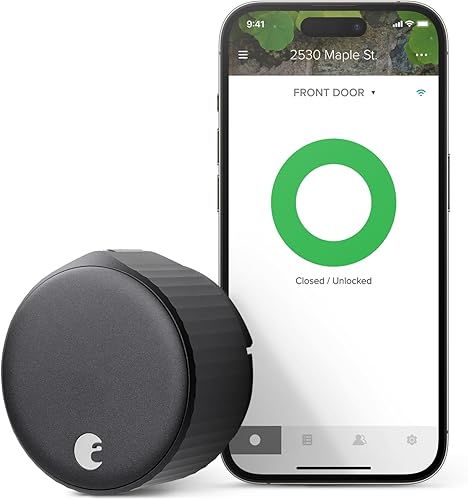
August Smart Lock (3rd Gen) with Connect Wi-Fi Bridge
Keeps your existing exterior hardware and key since it mounts on the interior side. The included Connect Wi-Fi bridge handles remote access, auto-lock and auto-unlock run through the August app, and it plays nice with Alexa, Google, and HomeKit. The easiest upgrade for most front doors.
Check price on Amazon →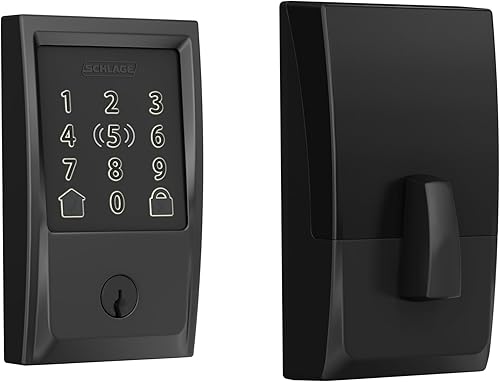
Schlage Encode Plus
WiFi keypad deadbolt with Apple Home Key support. Tap your iPhone or Apple Watch to unlock, no app needed. Schlage's commercial-grade build in a residential smart lock.
See it on Amazon →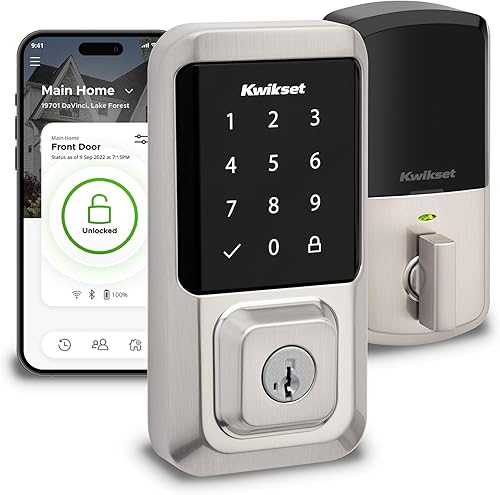
Kwikset Halo Touchscreen
WiFi smart lock with a touchscreen keypad at the most affordable price in this lineup. Works with Alexa and Google Assistant. Kwikset's SmartKey tech lets you re-key the lock yourself in seconds.
Check price on Amazon →Full Comparison Table
Click any column header to sort. Green highlights indicate the best value in that category.
| Lock | Type | Connectivity | Auto-Lock | Ecosystem | Price | Link |
|---|---|---|---|---|---|---|
| August Smart Lock (3rd Gen) with Connect Wi-Fi Bridge | Retrofit (interior only) | Bluetooth + WiFi (included Connect bridge) | Yes | Alexa, Google, HomeKit | $$$ | View |
| Yale Assure Lock 2 | Keypad + deadbolt | WiFi + Bluetooth | Yes | Alexa, Google, HomeKit (Matter via a swap-in module) | $$$ | View |
| Schlage Encode Plus | Keypad + deadbolt | WiFi + Bluetooth | Yes | HomeKit, Apple Home Key | $$$$ | View |
| Kwikset Halo Touchscreen | Touchscreen + deadbolt | WiFi + Bluetooth | Yes | Alexa, Google | $$ | View |
| Level Lock+ | Invisible (inside deadbolt) | Bluetooth + Wi-Fi | Yes | HomeKit (Apple Home Key), Alexa, Google | $$$ | View |
| Yale Assure Lock SL | Touchscreen + deadbolt | Bluetooth (WiFi w/ module) | Yes | Alexa, Google | $$$ | View |
Price tiers are approximate. $ = under $50, $$ = $50 to 150, $$$ = $150 to 300, $$$$ = over $300. Tap any link for the current Amazon price.
What Lock Owners Say After Months on the Door
Smart lock reviews split hard between five-star fans and one-star lockouts, and the reason is almost always connectivity or battery drain. Here's what top-helpful verified reviewers flag for each pick, paraphrased from the themes that repeat.
August Smart Lock (3rd Gen) with Connect Wi-Fi Bridge 4.4 stars from verified buyers
The pattern in long-term reviews is a rocky first week followed by quiet reliability: several buyers describe re-seating the adapter or adjusting deadbolt alignment before auto-lock and auto-unlock settle down. The strongest praise goes to the retrofit design itself, since nothing changes on the outside of the door. Expect to fiddle with the fit on day one.
Schlage Encode Plus 3.9 stars from verified buyers
Apple-household buyers who research several Home Key locks tend to land here and stay. Long-term owners report batteries stretching past three months of daily use, an improvement over locks they replaced. The recurring four-star caveat is that Apple Home Key pairing can act up during initial setup, so budget extra time for the HomeKit dance.
Yale Assure Lock 2 4.0 stars from verified buyers
The most-helpful positive feedback comes from HomeKit households running more than one unit, who single out the Yale Access app for managing them together. The critical reviews to read first describe the lock throwing errors and burning through batteries in about a month when the touchscreen overheats. Those complaints are rare but worth knowing about if the lock sits in direct afternoon sun.
Kwikset Halo Touchscreen 3.8 stars from verified buyers
Recent five-star buyers describe a fast install with clear instructions and remote locking that works as advertised. The loudest one-star complaint is the touchscreen itself, needing repeated taps before it wakes up, along with WiFi disconnects that occasionally force a factory reset. If the touchscreen is finicky, that's the lock talking, not you.
Level Lock+ 3.9-star verified-buyer average
Fans love the invisible profile: verified owners describe it as discreet and solid-feeling, and some come back for additional units. The one-star reviews to read before buying come from an unlucky minority whose Bluetooth, WiFi, and HomeKit pairing failed on attempt after attempt. Plan a return window in case you draw a dud.
Jacob’s read on this category
A smart lock is a mechanical part first and a gadget second, which is why the cycle ratings in the security section deserve more attention than the app screenshots. A front door takes thousands of actuations a year, so the gap between a Grade 1 deadbolt rated for 250,000 open-close cycles (the ANSI/BHMA Grade 1 deadbolt standard) and a Grade 2 rated for well under that is a genuine longevity difference, not spec trivia. Retrofit designs like August carry different fine print: they inherit whatever security grade your existing deadbolt already has. Match the grade to your busiest door, and treat the connectivity features as the tiebreaker rather than the headline.
How Smart Locks Work
A smart lock replaces or augments your deadbolt so you can lock and unlock with a phone app, voice command, or keypad code instead of a physical key. Two approaches dominate the category, and the right one for you depends on your door and your habits.
Retrofit locks install on the interior side of your existing deadbolt. You keep the current exterior hardware and your physical keys still work. The August Smart Lock (3rd Gen) with Connect Wi-Fi Bridge uses this approach. Installation takes about 10 minutes and nothing changes from the outside. Good for renters, or for anyone who likes their current exterior hardware. The trade-off: no keypad, so you still need your phone or a key from outside.
Full-replacement locks swap out the entire deadbolt. Models like the Schlage Encode Plus, Yale Assure Lock 2, and Kwikset Halo replace both the interior and exterior hardware, which is how they get a built-in keypad or touchscreen on the outside of the door. You punch in a code and you're in. Installation takes 15 to 30 minutes and requires pulling out your old deadbolt completely.
Then there's the invisible approach. The Level Lock+ fits entirely inside the deadbolt bore, so your door looks traditional from both sides. It's the smallest smart lock on the market and works with standard deadbolt hardware. No keypad, no visual sign that you have a smart lock at all. Which is the whole point.
Connectivity: WiFi vs Bluetooth vs Z-Wave vs Thread
WiFi locks connect directly to your home network and give you remote access out of the box. You can lock or unlock from anywhere with an internet connection. The Schlage Encode Plus, Yale Assure Lock 2, and Kwikset Halo have WiFi built into the lock; the August gets its WiFi from the plug-in Connect bridge included in the bundle we link. The downside is battery life. WiFi locks typically want fresh batteries every 6 to 10 months.
Bluetooth gives you roughly 30 feet of range between the lock and your phone. It sips power compared to WiFi, so batteries last longer, but you lose remote control unless you add a WiFi bridge or hub. The Yale Assure Lock SL is Bluetooth by default and needs an optional WiFi module for remote access.
Z-Wave is a low-power mesh protocol used in home automation. Z-Wave locks talk to SmartThings, Hubitat, and other Z-Wave hubs. Pick this one if you already run a Z-Wave smart home.
Thread is the newest of the bunch, built for low-power, low-latency mesh networking. Thread devices act as mesh nodes for each other, so range grows throughout your home without a dedicated hub. None of the locks in this lineup use Thread today; most rely on built-in WiFi or Bluetooth instead.
Security Features Compared
The whole point of a smart lock is convenience without giving up security. Here's how the locks in this comparison stack up on the things that actually matter for protecting your home.
Encryption
Every lock in this comparison uses AES 128-bit encryption at minimum between the lock and your phone or hub. The Schlage Encode Plus and Yale Assure Lock 2 use AES 256-bit. In practice, both are plenty. AES 128-bit has never been publicly broken, and the gap between 128 and 256 bit is academic for residential use. What matters more is keeping firmware updated, since manufacturers patch vulnerabilities through software updates.
Auto-Lock
All six locks support auto-lock, which throws the deadbolt after a set delay (typically 30 seconds to 5 minutes). It's one of the most underrated security features on this list. Forgetting to lock the front door is one of the most common security lapses, and auto-lock kills that problem. The August Smart Lock (3rd Gen) with Connect Wi-Fi Bridge also supports auto-unlock, which uses your phone's GPS to detect when you're walking up to the house and pops the deadbolt before you reach the door.
Tamper Alerts
The Schlage Encode Plus, Yale Assure Lock 2, and Kwikset Halo all include built-in tamper alarms that fire if someone tries to force the lock or pry off the exterior escutcheon. The lock itself emits a loud beep and fires a push notification to your phone. The August Smart Lock has no built-in siren; it relies on August app alerts for lock status, and its physical tamper resistance is whatever your existing exterior deadbolt hardware already provides.
Guest Access and Access Codes
The keypad locks (Schlage Encode Plus, Yale Assure Lock 2, Yale Assure Lock SL, Kwikset Halo) let you create unique access codes for family, house cleaners, dog walkers, or Airbnb guests. Codes can be scoped to specific days or time windows, and you can revoke them instantly from the app. The Schlage supports up to 100 codes. Yale and Kwikset both support up to 250.
The August Smart Lock (3rd Gen) with Connect Wi-Fi Bridge handles guest access differently. Since there's no keypad, you share access through the August app by inviting someone as a guest user. They have to download the app and make an account, which is more friction than simply handing out a door code.
Physical Security Grade
The Schlage Encode Plus carries an ANSI/BHMA Grade 1 rating, the highest residential security grade. Grade 1 deadbolts are rated for 250,000 open-close cycles (the ANSI/BHMA Grade 1 deadbolt standard) on top of forced-entry resistance testing. The Kwikset Halo carries a BHMA Grade AAA rating, the top residential grade on the BHMA scale. The Yale Assure Lock 2 is ANSI Grade 2, a lower cycle rating but still fine for residential use. The August Smart Lock inherits whatever grade your existing deadbolt has, which is a plus if you already have a high-quality deadbolt installed.
Ecosystem Compatibility
Your voice assistant and smart home platform should heavily influence the lock you buy. Ecosystem support decides whether you can say "Hey Siri, lock the front door," or build an automation that throws the deadbolt when your security system arms at night.
Alexa
Four of the six locks here work with Alexa: August Smart Lock (3rd Gen) with Connect Wi-Fi Bridge, Yale Assure Lock 2, Kwikset Halo, and Yale Assure Lock SL. You can use voice commands to lock the door (Alexa requires a PIN confirmation to unlock for security reasons) and drop the lock into Alexa routines. If your household runs on Echo devices, any of the four will fit right in.
Google Home
The same four locks that support Alexa also work with Google Home. You can lock and unlock with Google Assistant voice commands through Nest speakers and displays. Google also requires voice PIN verification for unlocking, which matches Alexa's approach.
Apple HomeKit and Home Key
HomeKit support is more limited. The August Smart Lock (3rd Gen) with Connect Wi-Fi Bridge, Schlage Encode Plus, Level Lock+, and Yale Assure Lock 2 all work with HomeKit out of the box (the Yale over the Bluetooth radio built into every Assure Lock 2). But only the Schlage Encode Plus and Level Lock+ support Apple Home Key, the feature that lets you tap your iPhone or Apple Watch to the lock like an Apple Pay terminal. Home Key is genuinely convenient, and you don't need to open an app. If you're deep in the Apple ecosystem, buy the Schlage Encode Plus.
Matter
Matter is the emerging universal smart home standard backed by Apple, Google, Amazon, and Samsung. The Yale Assure Lock 2 has the cleanest upgrade path here: its swappable module design accepts Yale's separate Matter module, sold on its own. The Wi-Fi SKU linked in this guide ships with the Wi-Fi module, and the lock holds one module at a time, so moving to Matter means swapping modules rather than replacing the lock. If you want the option to switch ecosystems later, that modularity is a meaningful advantage.
Installation: Can You Do It Yourself?
One of the best things about smart locks is that almost anyone can install one. You don't need an electrician or a locksmith. Every lock in this comparison is designed for DIY installation, and in most cases the only tool you need is a Phillips-head screwdriver.
Retrofit Locks (August): 10 Minutes
The August Smart Lock (3rd Gen) with Connect Wi-Fi Bridge is the easiest to install. Remove your existing interior thumb turn (the thing you twist to lock the deadbolt from inside), attach the August mounting plate over the existing deadbolt, and snap the August lock body on. Your exterior hardware and key stay exactly as they are. About 10 minutes, start to finish, for a first-timer, plus plugging the included Connect bridge into an outlet near the door for remote access. August includes an adapter kit to fit different deadbolt styles.
Full Replacement Locks (Schlage, Yale, Kwikset): 15-30 Minutes
The Schlage Encode Plus, Yale Assure Lock 2, Yale Assure Lock SL, and Kwikset Halo all require pulling your existing deadbolt out and dropping the new one in its place. It's still straightforward. Remove four screws from the current deadbolt, pull it out, and install the new lock in the same bore holes. All four manufacturers include detailed instructions and video tutorials. Budget 15 to 30 minutes depending on your familiarity with basic home hardware.
The one thing to verify before buying is that your door has a standard deadbolt preparation: a 2-1/8 inch bore hole on the face of the door and a 1-inch bore on the edge. Almost every residential door in the United States uses this standard. If your home has a mortise lock (common in older apartments and pre-1960s homes), you'll need a mortise-specific smart lock or a pro installer.
Invisible Lock (Level): 15 Minutes
The Level Lock+ replaces the interior of your deadbolt mechanism while keeping the exterior hardware in place. Installation is similar to a full replacement, but the finished result looks identical to a traditional deadbolt from both sides. Level includes several adapter kits to fit different door preparations.
Which Smart Lock Should You Get?
How This Lock Lineup Was Verified
Smart lock reviews lie more than most product categories. Battery life claims are almost always optimistic, and connectivity "just works" means "works until your WiFi blinks." We pulled every lock's current specs, verified the connection protocol against manufacturer docs (not marketing pages), and read the top-helpful verified reviews to find out which locks drop offline and how often. Prices and stock status were re-checked against the live Amazon listings on 2026-10-17. Grade and connectivity specs for the top-ranked keypad lock come from Schlage's Encode Plus page, and the deadbolt grades follow the ANSI/BHMA standard from the Builders Hardware Manufacturers Association. When the shortlist is down to two, we have matchups for the common pairs: Schlage Encode Plus vs Ultraloq U-Bolt Pro and Kwikset Halo Select vs Yale Assure Lock 2.
We don't accept payment from any manufacturer. Rankings come from product specifications and aggregate owner feedback, with heavy weight on the 1-star and 2-star reviews where real installation pain tends to surface. Spot an error? Let us know.