Quick answer: start a HomeKit setup at the front door with the August Smart Lock (3rd Gen), the best entry smart lock for HomeKit here, then add the Ecobee Premium if you also want an all-in-one HomeKit thermostat.
Bottom Line
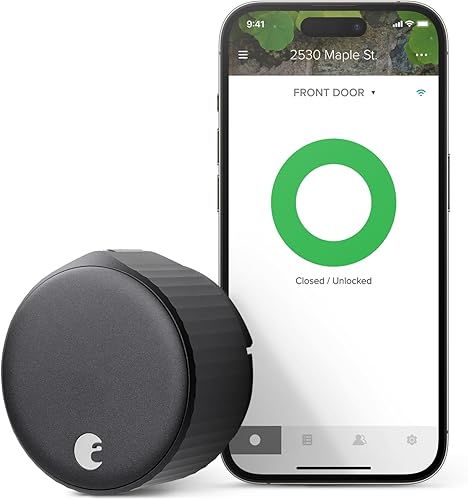
August Smart Lock
Works with HomeKit, Alexa, and Google Home. The included Connect Wi-Fi bridge covers remote access, retrofitting over an existing deadbolt is easy, and HomeKit integration is reliable. Best for renters and homeowners who want flexibility without replacing a door lock entirely.
See August Smart Lock →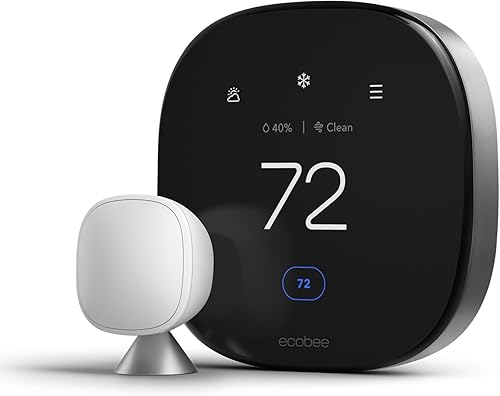
Ecobee Premium
Full HomeKit support with voice control via Siri. High-res touchscreen, built-in humidity and air quality sensors, and reliable scheduling automations. Best for homes that prioritize HomeKit automation and don't want a separate thermostat display.
See Ecobee Premium →HomeKit is now mature enough that choosing a smart home based on Apple devices makes sense. These are the devices that have earned trust through real-world use, broad compatibility, and reliable HomeKit integration.
HomeKit Essentials You Need
Before buying HomeKit devices, you need three things: an Apple device to manage it (iPhone, iPad, or Mac), a home hub, and basic understanding of what HomeKit does.
Do You Need a HomeKit Hub?
Yes, for practical use. A hub (Apple TV 4K, HomePod, HomePod mini, or iPad) stays at home and handles automation when you're away. Without a hub, HomeKit devices only work when you're on your home WiFi. Set one up before adding cameras or building automations.
Apple TV 4K as Your Home Hub
The most reliable hub. Requires an Apple TV 4K plugged into your network (not your TV). Set it up in Settings > AirPlay and HomeKit, tap Home, and select it as your home hub. HomeKit requires a wired connection for the hub, so Ethernet is ideal but WiFi works in a pinch.
HomeKit Secure Video
A paid iCloud+ feature that adds encrypted video recording to HomeKit cameras. With HomeKit Secure Video, cameras record continuously and save 10 days of history. Without it, you get live view only. Costs are included in iCloud+ plans: 50GB ($0.99/mo), 200GB ($2.99/mo), 2TB ($9.99/mo).
HomeKit Cameras
HomeKit cameras split into two types: wired doorbells and battery-powered outdoor cameras. Both require HomeKit Secure Video for recording, but both offer live view without a subscription.
Aqara G410 Video Doorbell Camera
The most affordable HomeKit video doorbell. Wired doorbell replacement (requires 16-24V transformer), records in 2K resolution, and supports HomeKit Secure Video. No battery means no charging, and HomeKit automations trigger when someone presses it. Owners report reliable HomeKit connectivity and quick video processing.
Logitech Circle View Wired Doorbell
Second option for HomeKit doorbells. Wired installation, 2K recording, and tight HomeKit integration. Slightly higher price than Aqara but equally reliable. Pick based on aesthetics.
Aqara G5 Pro Outdoor Camera
Best HomeKit camera for wide-angle outdoor recording. Battery-powered (12-month battery life), 2K resolution, 180-degree field of view, and HomeKit Secure Video support. Thermal sensor for motion detection means fewer false alerts. Install on your garage, garden shed, or side fence for coverage without wiring.
Both Aqara cameras support HomeKit Secure Video and integrate with the Home app's Person/Package detection. Neither requires a separate hub beyond what HomeKit already needs.
Smart Locks for HomeKit
HomeKit smart locks fall into two categories: retrofit locks that replace an interior mechanism, and standalone locks that replace the entire deadbolt. Retrofit is better for renters.
Level Lock Pro
A retrofit lock hidden inside your existing door frame. No visible hardware changes, which makes it ideal for renters or anyone who wants to avoid replacing their front door lock. HomeKit integrates natively: unlock from the Home app, use Siri voice commands, and trigger automations when you arrive home.
Installation requires removing your interior door trim and feeding the lock mechanism through the door frame, so it's not a five-minute job. But once installed, it's invisible to guests. Works via WiFi and Thread for redundancy.
August Smart Lock
A retrofit HomeKit lock that mounts over your existing deadbolt. No door modification required, just screw it on. WiFi comes from the Connect bridge included in the bundle (no Thread), HomeKit integration is rock solid, and it's cheaper than Level Lock. Supports app-based guest access, remote unlock, and automations; there is no keypad, though August sells one as a separate accessory.
The visible hardware on your door might bother some people, but for renters and anyone unwilling to modify their door frame, the August is the easiest path to a HomeKit smart lock.
Schlage Encode Plus 3.9 stars from verified buyers
A full-replacement deadbolt with Apple Home Key and HomeKit support. Requires complete deadbolt replacement (more involved than August). Built-in WiFi means no separate hub is required, and it carries an ANSI/BHMA Grade 1 rating, the highest residential security grade. Best for homeowners committed to HomeKit and willing to replace their existing deadbolt. Tap your iPhone or Apple Watch to unlock with Home Key.
For apartments, Level Lock or the August Smart Lock. For homes, any of the three work, but the Schlage Encode Plus pairs Apple Home Key with the top ANSI/BHMA Grade 1 security rating.
HomeKit Thermostats
HomeKit thermostats are still a minority in the smart thermostat market. Most thermostats target Alexa and Google Home users. But the HomeKit options are excellent.
Ecobee Premium
Full HomeKit support, voice control via Siri, and a high-res color touchscreen. Includes sensors for humidity and air quality, which HomeKit automations can read. Install via existing wires (no special requirements). HomeKit scheduling is reliable, and Siri voice commands work instantly.
Honestly the best HomeKit thermostat on the market. If you're all-in on HomeKit, Ecobee is the obvious choice.
Eve Thermo Smart Radiator Valve
For homes with individual radiator controls (common in Europe, less common in the US). Thread-connected for reliability, HomeKit automations trigger room-by-room. Works in US homes with compatible HVAC radiators.
If you have a modern HVAC system, Ecobee. If you have radiators, Eve Thermo.
HomeKit Lighting & Switches
Smart lighting is where HomeKit shines. The ecosystem supports both plug-and-play bulbs and in-wall switches.
Eve Light Strip
Addressable LED light strip with HomeKit support. Thread-connected, synchronized with Siri scenes, and dimmable to any color. Mount behind a TV, under cabinets, or along a bookshelf. Best for accent lighting and mood automations.
Lutron Caséta Smart Dimmer
In-wall light switch replacement with HomeKit support. Installs where your existing switch is, controls dimmers, and supports Thread. Lutron hardware is industry-standard reliable. Best if you want wall switches that feel like real switches but support HomeKit automations.
LIFX Smart Bulbs
WiFi bulbs that work with HomeKit directly (no hub required for basic function, though hub recommended for automations). Just screw in, add to HomeKit, and control from the Home app. Cheaper per-bulb than Eve or Lutron, and compatible with Alexa and Google Home too.
For renters, LIFX bulbs. For homeowners building a long-term setup, Lutron Caséta switches provide the most stable, professional-grade experience.
HomeKit Hubs & Thread Border Routers
HomeKit devices connect via WiFi or Thread. Thread is more reliable for battery-powered devices, but requires a Thread border router.
Apple TV 4K (Home Hub)
The most reliable home hub. Plugged into your network, manages HomeKit automations, and acts as a Thread border router (on newer models). Required for reliable away-from-home access and automations. Price is the downside, but reliability is worth it.
HomePod mini (Home Hub)
Smaller, cheaper alternative to Apple TV 4K. Doubles as a smart speaker with Siri. Also acts as Thread border router. Works fine as a home hub, though some users report Apple TV 4K being slightly more stable.
iPad (Home Hub)
If you have an old iPad plugged in, it can be your home hub. Not ideal long-term, but works in a pinch while you figure out your permanent hub setup.
Thread border routers are automatic with Apple TV 4K and HomePod mini. If you buy Thread-enabled devices (Eve and some Aqara models), they'll use Thread automatically for redundancy and reliability.
HomeKit Smart Plugs
Smart plugs are the gateway to HomeKit automation. Plug in a lamp, coffee maker, or fan, then automate it with HomeKit scenes.
Eve Energy Smart Plug
HomeKit smart plug with power metering. See how much electricity each device is using, build automations based on usage, and thread-connected for reliability. Slightly more expensive but worth it if you care about energy tracking.
Meross Smart Plug Mini
Budget HomeKit smart plug, four-pack on Amazon. No power metering, but HomeKit integration works perfectly. Best value for pure automation without energy tracking.
Smart plugs are one of the cheapest ways to add HomeKit automation to any device with a cord. Start here if you're new to HomeKit.
What HomeKit Users Actually Report
HomeKit reliability depends on hub stability and device WiFi/Thread connectivity. Here's what real users say about the devices above.
August Smart Lock: Broadly reliable
Users report solid HomeKit connectivity, instant unlock from the Home app, and consistent automations when arriving home. The most common complaint is dependence on the Connect bridge's WiFi link (no Thread), which occasionally causes delays if your router hiccups. Retrofit smart locks universally appreciate the lack of door modifications.
Ecobee Premium Thermostat: Stable scheduling
HomeKit automations work reliably. Siri voice commands integrate naturally. The main gripe is Ecobee's companion app being more feature-rich than HomeKit, which encourages some users to switch back to Ecobee's own interface instead of using HomeKit fully.
Apple TV 4K as Home Hub: The gold standard
Users who make Apple TV their dedicated hub report the most stable HomeKit experience. Automations trigger reliably, remote access is fast, and the Thread border router (on newer models) dramatically improves device reliability. Switching away from Apple TV to HomePod or iPad often results in connection dropouts.
Aqara Cameras on HomeKit: Good but occasional sync lag
HomeKit Secure Video works, but some users report the first few seconds of person/package detection are slow to appear in Secure Video. Live view is instant. Overall, HomeKit cameras are more reliable than competing Alexa/Google options when you don't factor in subscription cost differences.
Thread-enabled devices: Major stability win
Users with Thread border routers and Thread-enabled locks, lights, and accessories report far fewer connection issues. Thread devices automatically hop through your home's mesh instead of hitting WiFi bandwidth limits. If you're building a large HomeKit setup, Thread support becomes essential.
Jacob’s read on this category
Buy the infrastructure before the gadgets. Most HomeKit frustration traces back to two gaps: no home hub, so automations and remote access quietly fail, and no Thread border router, so battery-powered devices fall back to spotty Bluetooth. An Apple TV 4K closes both gaps at once, which is why it earns a full section on this page instead of a footnote. Budget for it, and for iCloud+ if you want Secure Video recordings, the same way you budget for the lock or camera itself.
HomeKit vs Alexa vs Google Home
HomeKit strength: Privacy. HomeKit encrypts data end-to-end and stores automations on-device via your hub. No data goes to Apple's servers for processing. Automations work even without internet if your hub is on your local network.
HomeKit weakness: Device selection. Fewer brands make HomeKit devices than Alexa/Google devices. HomeKit cameras require HomeKit Secure Video subscription, while Ring and Wyze have free cloud options. Automation UI is simpler than Alexa Routines but less powerful.
The honest take: HomeKit is the right choice if you own an iPhone, care about privacy, and don't mind fewer device options. Alexa is better for budget device selection. Google Home sits in the middle.
Don't mix ecosystems within a single room. HomeKit devices won't talk to Alexa devices, so pick one per room to avoid automation conflicts.
Which HomeKit Devices Should You Buy?
Frequently Asked Questions
How This HomeKit List Was Built
HomeKit device selection changes based on Thread adoption, iCloud+ integration, and ecosystem stability. We reviewed HomeKit devices certified by Apple, cross-checked Amazon reviews and star ratings for consistency, and verified home hub configuration requirements against Apple's documentation and owner reports of real-world reliability. We prioritized devices that balance HomeKit-first design with dual-ecosystem support (devices that work with both HomeKit and Alexa/Google Home tend to have broader availability). Certification status was confirmed against Apple's Home app accessory list, and Matter-over-Thread claims against the Connectivity Standards Alliance product database. For the camera side of a HomeKit build, Aqara vs eufy compares a wired HomeKit Secure Video camera with a solar one, and our HomeKit lock roundup goes deeper on Home Key support.
We do not take payment from Apple, August, Ecobee, Aqara, or any brand mentioned here. If you spot an error, please let us know.