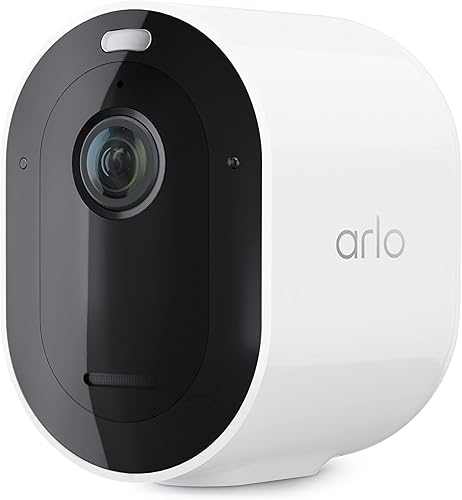
Quick answer: buy the Arlo Pro 5S 2K for sharper video and support across Alexa, Google, and Apple HomeKit. A Google Home household can stay in the family with the Google Nest Cam (Battery), which covers on-device alerts free, no subscription required for the basics.
Bottom Line
Video Quality & Ecosystem
2K to 4K HDR video across the lineup, color night vision, and the only camera here that works natively with Alexa, Google Home, and Apple HomeKit at once. If you want the best picture and you don't want to be locked into one voice assistant, Arlo is the safer buy.
See Arlo Pro 5S 2K →Google Home Integration & Free AI Alerts
Person, animal, vehicle, and package detection run on the camera itself, so the core alerts work even if you never pay for Nest Aware. Nest Aware, when you do subscribe, covers every Nest camera in the home for one flat monthly fee rather than charging per device.
See Nest Cam →Buy the wrong one here and you won't find out until you actually need the footage. A camera stuck at 1080p turns a porch visitor into a gray smear once the sun goes down, and a camera with no local storage option goes quiet the moment your subscription lapses or your WiFi drops mid-event. Pulling apart four cameras, two subscription models, and two very different takes on where the AI runs settles which mistake you're more likely to make.
Ecosystem Head-to-Head
Arlo and Nest Cam solve the same problem from opposite directions. Arlo ships better sensors and plays fair across every smart home platform. Nest Cam leans on Google's AI running locally on the camera and prices its subscription per home instead of per device. Here's the full picture before we get into individual cameras. For a broader field beyond just these two brands, see our best security cameras roundup.
| Feature | Arlo | Nest Cam |
|---|---|---|
| Camera price range | $$ to $$$ | $$$ |
| Video resolution range | 2K – 4K | 1080p |
| Voice assistant | Alexa, Google, Siri (HomeKit) | Google Assistant (native); Alexa view-only on Echo Show |
| Apple HomeKit | Yes (Pro 4, Pro 5, Ultra 2) | No |
| Free detection without a subscription | Basic motion alerts only | On-device person, animal, vehicle, package |
| Local storage | Yes (USB via SmartHub) | None |
| Subscription (per camera) | $7.99/mo (Arlo Secure) | Not offered; Nest Aware is home-wide only |
| Subscription (whole home) | $17.99/mo (Arlo Secure Plus) | $8/mo (Nest Aware), $15/mo (Nest Aware Plus) |
| Professional monitoring | Separate add-on | Not offered |
| Two-way audio | Yes | Yes |
| Alarm system integration | Third-party only | None (Nest Secure was discontinued in 2020) |
Price tiers are approximate. $ = under $50, $$ = $50 to 150, $$$ = $150 to 300, $$$$ = over $300. Tap any link for the current Amazon price.
Arlo wins on hardware, storage flexibility, and voice assistant coverage. Nest Cam wins on free on-device AI and a subscription that doesn't get more expensive as you add cameras. Where you land depends on whether you'd rather pay more for openness or get more for free from a single ecosystem.
Camera Lineup: Arlo vs Nest Cam at Every Price
Both brands sell a mid-range and a premium model. Comparing them tier by tier is fairer than pitting a budget camera against a flagship.
| Tier | Arlo | Nest Cam | Winner |
|---|---|---|---|
| Mid-Range | Arlo Pro 5S 2K 2K HDR, 160° FOV, color night vision, dual-band WiFi View |
Nest Cam (Battery) 1080p HDR, wire-free, on-device alerts, indoor or outdoor View |
Arlo. Sharper sensor at a similar price |
| Premium | Arlo Ultra 2 4K HDR, 180° FOV, color night vision, spotlight, wire-free; sold as a 2-camera kit with the required SmartHub View |
Nest Cam with Floodlight 1080p HDR, wired, built-in floodlight, 180° motion detection View |
Arlo. 4K resolution the Nest Floodlight doesn't match |
At both tiers Arlo's sensor spec sheet is ahead on paper. But the Nest Cam with Floodlight requires existing floodlight wiring, which some buyers prefer over managing battery charge cycles, and Nest's free on-device detection narrows the practical gap for anyone who won't pay for a subscription either way.
Owner Feedback on Both Cameras
Aggregated owner feedback across both brands points to two very different pain points: Arlo owners consistently flag battery drain on the higher-resolution models, while Nest Cam owners consistently note that losing WiFi for even a few minutes means losing that window of footage for good, since there's no local backup.
Arlo Pro 5S 2K: 3.9-star verified-buyer average
Owners praise the resolution and the dual-band WiFi switching, but a recurring complaint centers on weather sealing during heavy rain, with some buyers reporting condensation blurring the lens. Several reviews also flag that the subscription is effectively required to get full value out of the hardware.
Arlo Ultra 2 (4K HDR): 3.8 stars from verified buyers
The wide 180-degree field of view is the most-cited positive, especially from owners upgrading from narrower older Arlo models. The most persistent negative is battery life on driveways or high-traffic areas, where 4K recording combined with frequent motion events drains the battery noticeably faster than Arlo's quieter mid-range cameras.
Google Nest Cam (Battery): owners consistently report reliable on-device alerts
Owners frequently mention that person and package detection feel accurate without paying for Nest Aware, which is unusual among battery cameras in this price range. The recurring frustration is the lack of any local storage option: once the free 3-hour event window rolls off and you haven't subscribed, that clip is gone permanently.
Google Nest Cam with Floodlight: owners consistently report easy Google Home setup
Buyers who already run Google Home describe setup as straightforward since the camera slots into the same app as other Nest devices. The most common install complaint is that it requires existing floodlight wiring, so homes without that fixture in place need an electrician or a compatible mounting kit before the camera goes up.
Jacob’s read on this category
The real fork in the road isn't picture quality, it's where you want the AI and the storage to live. Nest Cam does its detection on the camera itself and gives it away for free, which is genuinely rare, but it backstops nothing locally, so a WiFi outage during a break-in is a real risk. Arlo charges more for its smarts but lets you keep a USB drive of footage that no outage or lapsed subscription can touch. If you already live inside Google Home, take the free AI. If you want a system that still works when your internet doesn't, budget for Arlo's SmartHub.
On-Device AI vs Subscription Costs
Winner: depends on how many cameras you own and whether you'll ever pay for a plan.
Nest Cam's biggest practical advantage is that its person, animal, vehicle, and package detection run directly on the camera hardware, not in the cloud. That means you get real, usable alerts on day one with zero subscription, something most competing brands gate entirely behind a paid plan. The catch is what that free tier does not include: no local storage, and only around 3 hours of free event video history before it's overwritten.
Nest Aware turns on 24/7 continuous recording and extends event history, and it's priced per home rather than per camera. Add a second or third Nest Cam and the Nest Aware bill doesn't move. Arlo's equivalent, Arlo Secure Plus, is also a flat whole-home rate, but it costs more per month at $17.99 than Nest Aware's $8 base tier, even though Arlo's per-camera plan at $7.99 is cheaper for a single camera.
For a single camera, Arlo's per-device plan and Nest's free on-device detection land in a similar place. For three or more cameras, Nest Aware's flat per-home pricing pulls meaningfully ahead of both Arlo tiers, assuming you're comfortable with 1080p footage and no local backup.
Smart Home Compatibility
Winner: Arlo, unless you're all-in on Google.
Arlo works with Alexa, Google Home, and Apple HomeKit, so switching ecosystems later, or running a mixed household, doesn't strand your cameras. HomeKit support specifically means Arlo feeds show up in the Apple Home app with full Siri access, something Nest Cam has never supported and shows no sign of adding, since Google has kept its cameras out of HomeKit entirely.
Nest Cam's tradeoff is depth over breadth. Inside Google Home, Nest Cam feeds integrate tightly with Nest Hub displays, Google Assistant routines, and other Nest devices like thermostats and doorbells. Our best Alexa devices guide and our smart home starter guide both cover how these ecosystem choices ripple into every other device you buy afterward, not just cameras.
Our take: if your home already runs on Google Assistant and you don't own an iPhone, Nest Cam's integration is genuinely excellent and the free on-device AI sweetens the deal. If you're on Apple devices, or you want the flexibility to switch ecosystems without replacing hardware, Arlo is the only real option between these two.
Which Camera Should You Choose?
Match the camera to your ecosystem and your tolerance for risk during an outage, not just the spec sheet.
Frequently Asked Questions
How This Matchup Was Researched
Arlo and Nest Cam get lumped together as "the two big smart camera brands," but they solve for different priorities: Arlo for open compatibility and hardware, Nest Cam for on-device AI and Google-native pricing. We pulled current Amazon listings for both brands' mid-range and premium models, cross-checked HomeKit and local-storage claims against each manufacturer's own product pages, and confirmed subscription structure directly against Arlo's and Google's current plan pages rather than relying on older per-camera pricing that no longer applies to Nest Aware. Stock and pricing were re-checked against live Amazon listings on 2026-10-17. Arlo's battery and resolution figures come from the Arlo Pro 5S 2K product page, and its current plan tiers from the Arlo Secure plans page. If the real question is Arlo against Ring rather than Arlo against Nest, our Ring vs Arlo comparison runs the same subscription math for that pair.
We do not take payment from Arlo, Google, or any brand mentioned here. If you spot an error, please let us know.
Prices and availability reflect Amazon listings at time of writing. Confirm on the product page before purchase.