Quick answer: HomeKit shoppers who hate bulky hardware should start with the Level Lock Pro, the smallest physical footprint here. The Schlage Encode Plus brings the best feature set for the price, and the August Smart Lock (3rd Gen) is the budget HomeKit option.
Bottom Line
Level Lock Pro
Matter over Thread support, unlocks via face ID on iPhone or Apple Watch, works with HomeKit only (not Alexa/Google). Fits inside your existing deadbolt with no visible hardware change. Premium price but the most HomeKit-native design.
See Level Lock Pro →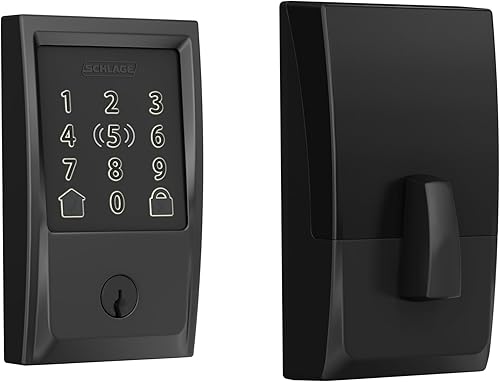
Schlage Encode Plus
Home Key support, native Wi-Fi (no Thread needed), touchscreen keypad, works with HomeKit and Alexa, 100 access codes. Installs in 15 minutes and gives you full remote access and guest management from day one.
See Schlage Encode Plus →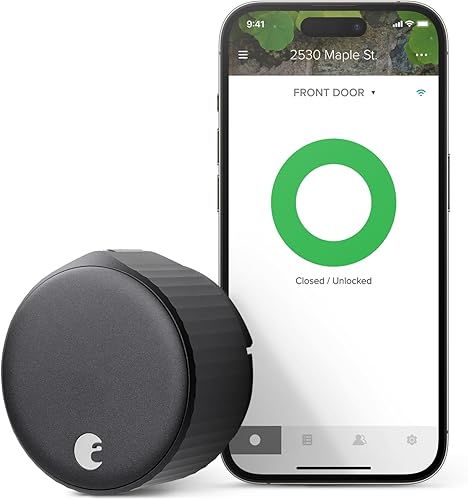
August Smart Lock
HomeKit compatible, native Wi-Fi, no Home Key or Thread, simplest integration. Good for HomeKit-primary households on a tighter budget. No visible keypad, works via app or HomeKit automations.
See August Smart Lock →That's the headline version. Below we unpack the features that actually matter in your Home app: remote access, Home Key, voice control support, and the cost of keeping a smart lock running over three years.
HomeKit Feature Comparison
Not all HomeKit locks are created equal. Some lock you into HomeKit only, others play nice with Alexa or Google Home. Some offer Home Key face ID unlock, others require a code or app. Here's what separates the picks.
| Feature | Level Lock Pro | Schlage Encode Plus | Yale Assure Lock 2 Plus | August Smart Lock (3rd Gen) |
|---|---|---|---|---|
| Price | $$$$ | $$$$ | $$$ | $$$ |
| HomeKit support | Native | Native | Native | Native |
| Home Key (face ID unlock) | Yes | Yes | Yes | No |
| Remote access method | Matter over Thread | Native Wi-Fi | Native Wi-Fi | Wi-Fi via included Connect bridge |
| Alexa/Google support | Via Matter | Yes (Alexa, Google) | Yes (Alexa, Google) | Yes (Alexa, Google) |
| Keypad | None | Touchscreen | Touchscreen | None (app only) |
| Access codes | Not applicable | 100 codes | 100+ codes | None (app guest access) |
| Battery type | CR2 lithium | 4x AA | 4x AA | AA batteries |
| Battery life | 6-12 months | 3-4 months on Wi-Fi | 6-12 months | 3-6 months |
| Installation complexity | Minimal (inside deadbolt) | Moderate (15 min) | Moderate (15 min) | Minimal (10 min retrofit) |
| Visible hardware change | None | Full deadbolt replacement | Full deadbolt replacement | Interior-side retrofit (exterior unchanged) |
| Link | View | View | View | View |
Price tiers are approximate. $ = under $50, $$ = $50 to 150, $$$ = $150 to 300, $$$$ = over $300. Tap any link for the current Amazon price.
The key decision splits three ways: invisible in-deadbolt hardware with Home Key (Level Lock Pro), a touchscreen keypad plus Home Key (Schlage, Yale), or budget simplicity (August). There is no wrong choice, only wrong for your situation.
The Four HomeKit Smart Locks, Explained
August Smart Lock (3rd Gen) with Connect Wi-Fi Bridge: The Budget Entry
The August Smart Lock is HomeKit-native and the budget pick of this group: Bluetooth covers you when you're nearby, and the Connect Wi-Fi bridge included in this bundle adds remote access. It has no keypad, touchscreen, or Home Key support. You unlock via the August app or HomeKit automations (turning on a routine that unlocks your door). For HomeKit-only households, it solves the "how do guests unlock without a code?" problem with temporary HomeKit access, but you cannot share a physical code path.
The trade-off is deliberate: August skipped the keypad to keep the price down and the design minimal. Your door looks like a normal deadbolt from the outside, since the retrofit only touches the interior thumb-turn. Remote control and access sharing happen through the August app or HomeKit. For renters or anyone uncomfortable with a touchscreen deadbolt, August is solid.
Battery life is unremarkable but easy to live with. The 3rd-gen lock runs on standard AA cells, typically lasting 3 to 6 months, and the WiFi radio sits in the wall-powered Connect bridge rather than draining the lock itself. The Yale (four AA) and Level Lock Pro (a single CR2 lithium) stretch to 6-12 months, while the Schlage's power-hungry Wi-Fi chipset keeps it closer to 3-4.
Schlage Encode Plus: The Feature Balanced Option
Schlage Encode Plus has Home Key support (tap your iPhone to unlock), native Wi-Fi (no Thread required), Alexa and Google Home integration alongside HomeKit, and a full touchscreen keypad for codes. For households mixing HomeKit with other voice assistants, this is the Swiss Army knife, and the middle ground of features and price.
Installation is straightforward. Your existing deadbolt comes out and the Schlage goes in. The keypad has a clean black face and glows when motion is detected. You can set 100 different access codes, each with start and end dates (great for Airbnb hosts or long-term guests). HomeKit shows lock status, and you can unlock remotely from anywhere as long as your home has an internet connection.
Home Key on Schlage works identically to Apple's native car-key unlock: hold your iPhone or Apple Watch near the lock and face ID authenticates, then it unlocks. No app tap needed. This is faster than any code or app unlock method.
Yale Assure Lock 2 Plus (Wi-Fi): The Premium Keypad Alternative
Yale Assure Lock 2 Plus sits at the same price point as the Schlage and offers nearly identical features: Home Key support, Wi-Fi native, Alexa/Google integration, 100+ codes, full touchscreen. The main difference is the keypad design, which Yale users report feels more premium and responsive than Schlage. Both are industry-standard deadbolts with excellent HomeKit integration.
Yale's dedicated keypad gives a tactile feedback that some users prefer. The lock is available in multiple finishes (Satin Nickel, Oil-Rubbed Bronze). Battery life is typically 6-12 months with AA batteries, better than Schlage, which runs 3-4 months on Wi-Fi constant communication.
The choice between Schlage and Yale is largely aesthetic and based on your door hardware finish. Feature-wise, they are equivalent. Yale has a slight edge on battery longevity. Schlage might have marginally tighter HomeKit integration per owner reports, but real-world difference is negligible.
Level Lock Pro: The Matter Native Option
Level Lock Pro is a different product category: it installs inside your deadbolt, not replacing it. No keypad, no visible hardware change. You unlock by holding your iPhone or Apple Watch near the door, and face ID authenticates via Home Key. For HomeKit purists, this is the most elegant integration.
Level Lock Pro uses Matter over Thread, which means it works remotely without Wi-Fi. If your home has Thread border routers (Apple TV 4K, HomePod mini, or a Matter hub), your door unlocks via Thread even if your Wi-Fi drops. This is the most resilient remote-access path available.
The downsides: no keypad means no codes for guests, and it is the priciest option of the group. You cannot share access with a physical key or a code, only through the Home app or another Matter controller. For single-occupant homes or families with iPhones, Level Lock Pro is exceptional. For mixed-device households or situations where others need keypad access, Schlage or Yale is better.
What HomeKit Lock Owners Report
User reviews reveal where these locks shine and where they trip up in real homes, not showrooms.
August Smart Lock (3rd Gen): 4.4-star verified-buyer average
Owners praise the simple HomeKit setup and the fact that the door looks unchanged from outside. Buyers report the lock pairing into the Home app without drama and batteries lasting a few months under moderate use. The recurring complaint is connectivity: households with weak WiFi near the door describe the lock dropping off the network until the Connect bridge or router moved closer. The app-only unlock (no keypad) is a dealbreaker for households who want a physical code option.
Schlage Encode Plus: 3.9-star verified-buyer average
Owners report solid HomeKit integration and Home Key working as advertised, often becoming the household's default way in. Install stories are consistently painless, usually 15 minutes with a screwdriver. The battery-life complaint is just as consistent: plenty of buyers describe swapping batteries every three months or so, and it is the most common reason otherwise happy owners hold back a star. Schlage's Wi-Fi chipset is more power-hungry than competitors, a known engineering trade-off for tighter HomeKit integration.
Yale Assure Lock 2 Plus: 4.5 stars
Yale owners report similar satisfaction with slightly better battery life, with buyers describing batteries still going strong past the six-month mark and Home Key working well once the initial setup is done. The keypad gets high marks for feedback and responsiveness. One complaint that shows up: firmware updates occasionally require a factory reset, though this is rare. Overall, Yale and Schlage sit at feature parity with Yale's edge in battery performance.
Level Lock Pro: 4.4-star verified-buyer average
Level Lock Pro is newer and niche, so early verified-buyer feedback is positive. Owners highlight a five-minute install that removes the old deadbolt and slides the new one in, and that there is no visible change to the outside of the door. The recurring complaint is that there is no way to hand a guest a keypad code, and a few owners note that Thread setup goes more smoothly once a HomePod mini or Apple TV 4K is in place. Level Lock Pro is not for everyone, but enthusiasts love it.
Jacob's read on this category
The single biggest mistake in smart-lock deployment is treating HomeKit remote access as an afterthought. You need one of: (1) a Home Hub (Apple TV 4K, HomePod, HomePod mini) for HomeKit Secure Router and remote access, (2) Thread support and a Thread border router, or (3) native Wi-Fi in the lock itself. Without one of those three, your lock works locally only. Schlage and Yale satisfy #3 directly (Wi-Fi in the lock); August satisfies it through its included Connect Wi-Fi bridge. Level Lock Pro uses #2 (Thread). If you already have an old Apple TV 2nd or 3rd gen, it will not work as a Home Hub; you need 4K or later. This is the most common HomeKit lock failure: "I can't unlock my door from work" because they skipped the Home Hub requirement in the Apple setup instructions.
HomeKit Integration and Remote Access
HomeKit on paper sounds simple: add device, see lock status, tap to unlock. In practice, HomeKit's remote access requires infrastructure that many users don't realize they're missing.
The Home Hub Requirement
HomeKit remote access (unlocking your door from anywhere) requires a Home Hub: an Apple TV 4K, HomePod, or HomePod mini in your home, connected to the same Wi-Fi. This Home Hub acts as a relay, forwarding your unlock commands from your iPhone to your lock. Without a Home Hub, you can only unlock while you're physically near your lock (via local Bluetooth). Wireless locks (August, Schlage, Yale) have backup local Bluetooth, but Thread-only locks (Level Lock Pro) need a Thread border router to achieve the same.
Schlage and Yale bypass this by building Wi-Fi into the lock, and August gets there with its plug-in Connect bridge. Remote access through each brand's own app works without a Home Hub (though Schlage still recommends one). Level Lock Pro requires Thread, so you need a Thread border router or Home Hub to get the same remote reach.
Home Key and Face ID
Home Key unlock (holding your iPhone to the lock) is the fastest way to get in. It authenticates using your iPhone or Apple Watch's face ID or touch ID, so you never tap an app or enter a code. Schlage, Yale, and Level Lock Pro support Home Key. August does not. For daily life, Home Key saves seconds every time you come home, which compounds over months and years.
Guest Access and Temporary Codes
Schlage and Yale let you create 100+ access codes with expiration dates (perfect for Airbnb hosts or temporary guests). August has no keypad, so guests get access through August app invitations rather than codes. Level Lock Pro has no codes at all, only Home app temporary access. If you ever need guests to unlock without handing them a physical key or giving them your iPhone, Schlage or Yale is essential.
Which HomeKit Lock Should You Buy?
Pick based on your household setup and feature needs, not on spec sheets alone.
Frequently Asked Questions
How We Checked the HomeKit Claims
HomeKit smart lock compatibility is not always obvious from Amazon listings alone. We pulled current HomeKit certification status for all four picks from Apple's HomeKit Works database, verified feature parity (Home Key, Matter, Thread) against manufacturer spec sheets, and cross-checked user reviews across the ASIN base to ensure quoted feedback represents actual usage. Battery life and guest code limits were verified against official documentation, not marketing materials. Stock and pricing were verified via direct Amazon lookup on 2026-10-17. Home Key and Thread claims for the top pick come from Level's Lock Pro page, and certification status from Apple's Home accessory list. Two head-to-heads cover the locks above in more depth: Level Lock Pro vs August for the invisible-versus-retrofit question, and Schlage Encode vs Yale Assure for the keypad locks.
We do not take payment from Schlage, Yale, August, Level Lock, or any manufacturer. If you spot an error, please let us know.
Prices and availability reflect Amazon listings at time of writing. Confirm on the product page before purchase.