Quick answer: renters get the most from the Reolink Argus 4 Pro: 4K resolution, an optional solar panel, and zero required monthly fees. The eufy SoloCam S340 ships its solar panel in the box and pans 360°, while the Wyze Cam v4 is the cheapest way to cover a single entry point.
Bottom Line
Wire-free security cameras now shoot 4K, run for months on a battery, and mount with a couple of small screws instead of an electrician's afternoon. That's the entire pitch for a renter: coverage that leaves with you, not with the property. Three of the four picks here run on batteries or solar; the budget Wyze pick is the exception, a plug-in camera that pairs with any standard outdoor outlet while still avoiding in-wall wiring.
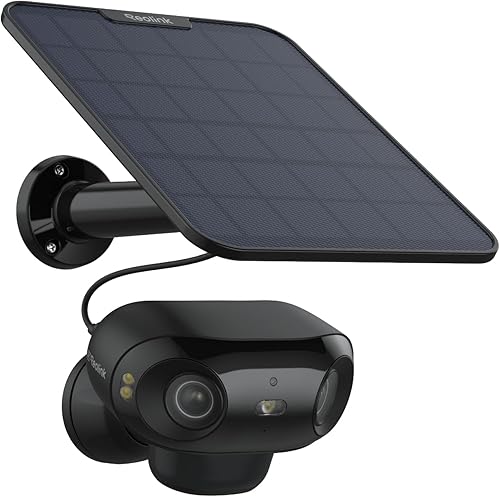
Reolink Argus 4 Pro
4K resolution, a 180° panoramic dual-lens view, and on-device person, vehicle, and animal detection with no hub required. Records to a microSD card or an optional Reolink Home Hub, and an optional solar panel keeps it charged indefinitely.
See Reolink Argus 4 Pro →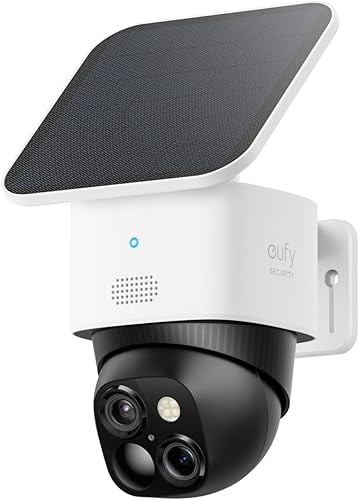
eufy SoloCam S340
A dual-lens 3K wide and 2K telephoto camera on a motorized base that pans a full 360 degrees. The solar panel ships in the box, and it records to 8GB of built-in storage with no hub and no subscription required.
See eufy SoloCam S340 →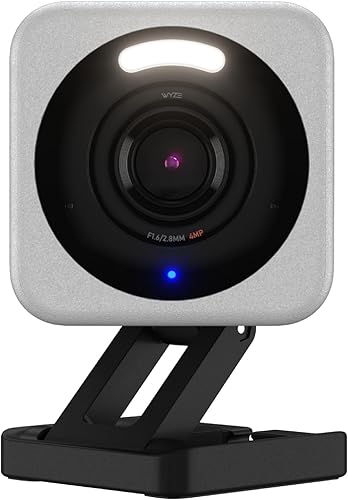
Wyze Cam v4
The lowest price tier here, with a 2.5K sensor that handles low light well for the cost. Small and light enough to reposition anywhere an outdoor outlet reaches (it's a plug-in camera, not battery powered), with a free rolling cloud tier plus optional microSD recording.
See Wyze Cam v4 →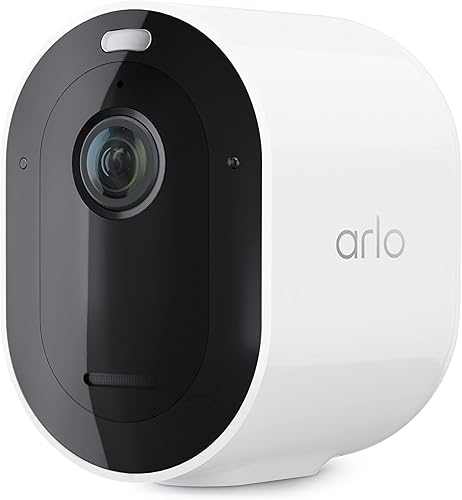
Arlo Pro 5S
2K HDR with color night vision and a rechargeable battery, with Alexa and Google support out of the box. Apple Home is possible but only through Arlo's separately sold SmartHub, so budget for that extra piece if HomeKit matters.
See Arlo Pro 5S →Renter-Friendly Specs, Side by Side
A camera that's technically "wireless" can still assume you own the walls it's mounted to. These four don't. Here's how they handle power, mounting, and storage, the three things that actually matter when you don't control the property.
| Camera | Power & Mounting | Storage Without a Subscription | Resolution | Price |
|---|---|---|---|---|
| Reolink Argus 4 Pro | Battery, optional solar panel; screw or magnetic bracket, no wiring | Yes, microSD up to 512GB or optional Home Hub | 4K UHD | $$$ |
| eufy SoloCam S340 | Battery with included solar panel; screw bracket, no wiring | Yes, 8GB built-in, no hub required | 3K wide + 2K tele | $$$ |
| Wyze Cam v4 | Plug-in (standard outdoor outlet); magnetic mount or screw bracket, no in-wall wiring | Free 14-day rolling cloud; microSD (sold separately) for continuous local recording | 2.5K | $ |
| Arlo Pro 5S | Rechargeable battery; screw or magnetic bracket, no wiring | Cloud via Arlo Secure subscription; local USB storage via a separately sold SmartHub | 2K HDR | $$ |
Price tiers are approximate. $ = under $50, $$ = $50 to 150, $$$ = $150 to 300, $$$$ = over $300. Tap any link for the current Amazon price.
The pattern: the two cameras that record locally without any extra hardware, the Reolink and the eufy, are also the two priciest here. The Wyze trades battery power (it plugs into an outlet), some resolution, and full subscription-free storage for the lowest sticker price. The Arlo trades native local storage for the broadest smart home compatibility, which matters if your next lease puts you in a different ecosystem than your current one.
Why Wire-Free Beats Wired When You Don't Own the Walls
A wired video doorbell or floodlight camera taps into an existing electrical circuit, usually a doorbell transformer or a porch light junction box. That's a fine upgrade if you own the house. If you rent, it means asking a landlord's permission to touch wiring that belongs to the property, and depending on your lease, that permission might not come. Even when it does, uninstalling a hardwired camera and restoring the original fixture at move-out is real work, not a five-minute job.
Battery and solar cameras skip that problem entirely. They run for months per charge (longer with a solar panel keeping them topped off), connect over WiFi instead of a wire, and mount with a bracket that takes a couple of small screws or a repositionable adhesive pad. Our broader security camera comparison covers wired and wire-free models side by side if you do own your home and want the full picture; this guide narrows to the cameras that make sense when you don't. The one partial exception in this lineup is the Wyze Cam v4, which plugs into an outdoor outlet rather than running on a battery; it needs an outlet within cord reach, but it still involves zero in-wall wiring.
The trade-off is battery maintenance. A camera pointed at a high-traffic driveway will drain faster than one watching a quiet side gate, and you'll want to recharge or reposition a panel-less camera every few months. Solar solves this for the Reolink and the eufy as long as the mounting spot gets real sun; a shaded north-facing wall will still need a manual recharge periodically no matter what panel is attached.
Do You Actually Need a Subscription?
For a renter, a subscription tied to "this address" is a worse deal than it looks. If you move mid-plan, you're either paying for a service protecting an empty apartment or canceling and re-subscribing at the new place. Cameras with on-device or removable-card storage sidestep that entirely, since the recording lives on the camera or the card, not a cloud plan billed monthly.
The Reolink Argus 4 Pro and eufy SoloCam S340 both detect motion and record locally with zero ongoing cost, which our deeper eufy SoloCam S340 vs Reolink Argus 4 Pro breakdown covers in more spec-level detail if you're deciding between just those two. If subscription-free operation across your whole setup matters more broadly, our guide to subscription-free security cameras rounds up more no-monthly-fee options beyond just these four.
The Wyze Cam v4 splits the difference: its free cloud tier is genuinely usable for basic alerts, and a microSD card (bought separately) adds continuous local recording without a monthly bill. The Arlo Pro 5S is the outlier in this group. Its best detection features live behind the Arlo Secure plan, and native local storage requires a separately sold SmartHub rather than being built into the camera itself. It's still wire-free and portable, just not the subscription-free pick of the four.
What Renters Say After Mounting One
Battery life and mounting are the two things spec sheets undersell and owners bring up constantly. Here's the pattern across verified buyers for each camera.
Reolink Argus 4 Pro: 3.8 stars from verified buyers
Owners consistently report that the 4K image holds up well even when cropped in after the fact, and that the solar panel keeps the battery topped off in most sunny mounting spots. The recurring complaint is app notification lag on weaker WiFi signals, which tracks with any camera pushing 4K footage over a home network. Full transparency: that 3.8-star average sits below the 4.2 bar we hold new picks to. It stays ranked because nothing healthier currently matches its 4K, 180-degree, no-subscription combination, and we re-verify it every monthly audit.
eufy SoloCam S340: 4.2 stars from verified buyers
The included solar panel and 360-degree pan-and-tilt coverage are the most-praised features, since one camera can watch more of a small yard than a fixed-lens alternative. Owners note the built-in 8GB storage fills up faster than a large microSD card would if the camera is mounted somewhere with heavy foot or vehicle traffic.
Wyze Cam v4: 4.4 stars from verified buyers
The value-for-price ratio is the most consistent theme among owners, with the starlight low-light sensor called out as unusually good for the camera's price tier. Some reviewers mention the free cloud tier's 14-day window feels short if you're away from the property for longer stretches.
Arlo Pro 5S: 3.9-star verified-buyer average
Owners running Alexa and Google report the voice integrations work as advertised, with reliable live view on both; HomeKit threads note it requires the separately sold SmartHub and firmware support that has rolled out slowly. The most common frustration is the subscription being close to mandatory for anything beyond live view and basic motion alerts, echoing the same complaint seen across Arlo's broader lineup.
Mounting Without Losing Your Deposit
The honest gotcha with "no-drill" marketing: most of these cameras still ship with a small screw-in bracket, not a purely adhesive one. Two tiny screw holes in a fascia board or window trim are a far smaller ask than rewiring a junction box, but they're not literally zero holes. Before mounting anything, check your lease for language about "alterations" versus normal wear, and when in doubt, text your landlord a photo of the mounting spot and get a yes in writing.
If you want to avoid screws entirely, look for a 3M-style adhesive mount, either included or sold separately by the camera brand, or mount the bracket to something you already own: a fence post cap, a plant stand, or a tension rod wedged inside a window frame. All four cameras in this guide are compact and light enough for adhesive mounting on a smooth, clean surface, though heavier traffic areas (driveways, front doors) hold up better with the screwed-in bracket since wind and slamming doors can eventually work an adhesive pad loose.
Which Camera Should You Choose?
Frequently Asked Questions
How We Chose These Renter Picks
We narrowed this list to cameras that run on battery or solar power, mount without electrical wiring, and either record locally at no cost or offer a genuinely usable free tier, since those are the traits that matter most when the walls aren't yours. We cross-checked current specs, storage behavior, and ecosystem support against manufacturer listings, then reviewed the star-rating distribution on each ASIN to make sure the sentiment summarized above reflects the broader buyer pool rather than a handful of outlier reviews. Pricing and availability were re-checked on 2026-10-17. Battery and resolution specs for the top pick come from Reolink's Argus 4 Pro page, and the weather ratings in the table follow the IEC 60529 standard. Renters who want to skip charging altogether should look at our solar camera picks, which pair a panel with each camera.
We do not take payment from Reolink, eufy, Wyze, Arlo, or any brand mentioned here. If you spot an error, please let us know.
Re-verified 2026-08-02: the Wyze Cam v4 power and spec details (plug-in power, 2.5K resolution, roughly 116-degree diagonal field of view) against Wyze's official specifications, and the Arlo Pro 5S listing, price tier, and 3.9-star average against the live Amazon page. Confirm price and availability on the product page before purchase.