Quick answer: covering a whole yard from one corner post calls for the eufy SoloCam S340, its solar panel ships in the box and the base pans a full 360 degrees; watching a wide driveway favors the Reolink Argus 4 Pro for its 4K dual-lens, 180-degree view; a single entry point on a tight budget is better served by the eufy SoloCam E30 and its removable solar panel.
Bottom Line
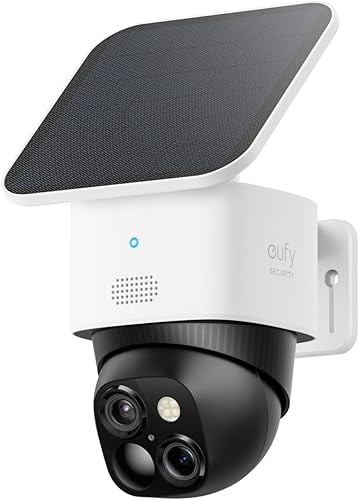
eufy SoloCam S340
The solar panel is already attached in the box, so there's no separate accessory to aim or wire in. A motorized base sweeps 360 degrees and the dual-lens sensor covers both a wide angle and a zoomed telephoto view from one mounting point.
See eufy SoloCam S340 →Reolink Argus 4 Pro
Two 4K lenses stitch a blind-spot-free 180-degree view, so one camera reads detail across a wide driveway that a single fixed lens would crop, and because the solar panel is a separate piece you can mount it in full sun even when the best camera angle points somewhere shadier. It carries a 3.8-star verified-buyer average, below the 4.2 floor we normally apply; we keep it for the sensor and say so plainly.
See Reolink Argus 4 Pro →eufy SoloCam E30
The lowest price of the three: 2K video, a motorized base with 360-degree AI tracking, and a removable solar panel that mounts on the camera or on its own. It gives up the S340's second telephoto lens and 3K wide sensor, which is the trade for the lower price.
See eufy SoloCam E30 →Mount the wrong camera at the wrong angle and its solar panel spends more days trickle-charging than actually topping off the battery, and within a month you're back to charging it by hand anyway. The camera matters less than most buyers assume. The panel placement is what decides whether you ever touch a charging cable again.
Head-to-Head Comparison
All three cameras ship with, or bundle in the same listing, a dedicated solar panel. Here's how the hardware differs once you look past that shared feature.
| Feature | eufy SoloCam S340 | Reolink Argus 4 Pro | eufy SoloCam E30 |
|---|---|---|---|
| Price (with solar panel) | $$ | $$$ | $$ |
| Solar panel | Built in, one mounting point | Separate piece, included in the box | Removable panel, included |
| Resolution | 3K wide + 2K telephoto (dual lens) | 4K, dual lens (180-degree stitched view) | 2K |
| Field of view / movement | 360° motorized pan-tilt | 180° dual-lens, fixed | 360° pan with AI tracking |
| Night vision | Color, integrated | ColorX color night vision | Check listing |
| Built-in siren | Check listing | Check listing | Check listing |
| Local storage without a hub | Yes, 8GB built in | Yes, via microSD | Check listing |
| Apple HomeKit | No | No | No |
| Voice assistant | Alexa, Google | Alexa, Google | Alexa, Google |
Price tiers are approximate. $ = under $50, $$ = $50 to 150, $$$ = $150 to 300, $$$$ = over $300. Tap any link for the current Amazon price.
The S340 is the only one of the three with the panel permanently attached to the camera housing, which is simpler to install but leaves you with one angle to compromise on. The Reolink ships its panel as a separate piece and the E30's panel is removable, which is more to mount but lets you point the panel at the sun independently of where the camera needs to point.
How Owners Rate These in Practice
A solar panel is the headline feature on all three listings, but it's rarely what separates a happy owner from a frustrated one. The pattern below is where the real differences show up.
eufy SoloCam S340: 4.3-star average from verified buyers
The included panel and the 360-degree motorized base draw the most consistent praise, since one camera reaches corners a fixed lens would miss. Owners also call out sharp daytime detail and reliable motion detection. The recurring complaint is connectivity: some buyers report the camera occasionally dropping off WiFi and needing a manual reconnect, alongside scattered notes about app responsiveness.
Reolink Argus 4 Pro: 3.8-star average from verified buyers, disclosed
Owners single out the 180-degree stitched view and daytime 4K detail, especially for reading movement at the far end of a driveway. The recurring complaints are what pull the average down: some buyers describe the battery draining faster than the panel replaces it in shaded spots, and others report app and connection hiccups. That average sits below the 4.2 floor this site normally applies to picks; we keep the camera here for the sensor rather than the reliability record, and say so.
eufy SoloCam E30: 4.2-star average from verified buyers
Owners praise the AI tracking that follows a person across the yard and the value at this price, with 2K daytime detail that holds up at porch and driveway distances. The recurring complaint is the one that follows every solar camera: mounted under a porch roof or on a north-facing wall, the removable panel does not keep up and the battery still needs a manual top-up every few weeks.
Jacob’s read on this category
Every "solar" listing in this space implies you'll never touch a charging cable again, and that promise only holds if the panel gets several hours of direct, unobstructed sun. Before you buy any of these, walk your mounting spot at the time of day the sun actually hits it, not just the general direction the wall faces. A camera with a separate panel, like the Reolink or the Wyze, is more forgiving here because you can chase the sun independently of the camera's ideal viewing angle. A camera with the panel built into the housing, like the eufy, is simpler to install but only works if that one spot gets real sun.
How Solar Charging Actually Works on These Cameras
The panel offsets battery drain. It doesn't replace the battery.
Every camera here still runs on an internal rechargeable battery. The solar panel's job is to trickle-charge that battery during daylight so you don't have to unclip it and charge it indoors. When sun exposure is strong and consistent, that trickle can outpace what the camera uses, and the battery effectively stays full. When exposure is weak, inconsistent, or blocked for part of the day, the panel only slows the drain rate. You'll still get a low-battery notification eventually.
Two things determine which outcome you get: mounting angle and how much power the camera burns between charges. A panel needs several hours of direct sun, not just daylight, to keep up with a busy camera. Motion-triggered recording, color night vision, and cloud uploads all pull more power than idle standby, so a camera mounted somewhere with heavy foot or vehicle traffic drains faster and needs more sun to compensate. If you're deciding between the eufy SoloCam S340 and a Reolink camera for a high-traffic spot like a driveway or a busy sidewalk, factor that traffic into how much sun the panel will need.
A separate or removable panel, like the Reolink and eufy E30 here, gives you more flexibility for awkward mounting spots: a porch roof might have the best camera angle but poor sun, so you run the panel cable to a sunnier spot on the same wall. A built-in panel, like the eufy's, is simpler to install but locks the panel to whatever angle the camera needs, so it's a better fit for an open yard or a south-facing wall with a clear sight line.
If you're weighing solar against a subscription-free camera that runs on battery alone, our broader roundup of security cameras without a monthly fee covers non-solar options too, including several that charge fast enough by USB that battery life is a non-issue.
Which Solar Camera Should You Buy?
Frequently Asked Questions
Behind This Guide
We looked for solar security cameras that either ship with the panel attached or are sold in a listing that bundles a matching panel, rather than pairing a bare camera with a third-party accessory of uncertain quality. Specs were cross-checked against manufacturer product pages, and pricing was pulled from current Amazon listings on 2026-10-17. Star ratings are shown only where we could confirm a verified-buyer average against the live listing; where we could not, we described owner sentiment qualitatively instead. Panel and battery specs for the top pick come from eufy's SoloCam S340 page, and the weather ratings follow the IEC 60529 standard.
We do not take payment from eufy, Reolink, or any brand mentioned here. If you spot an error, please let us know.