Quick answer: the Kwikset SmartCode 270 is our top pick for rental properties (no WiFi or app needed, rekeys in seconds between tenants); the Schlage Encode Plus (best for managing several properties remotely) and the August WiFi Smart Lock (4th Gen) (best when you can't replace the deadbolt) are the standout alternatives.
Bottom Line
Kwikset SmartCode 270
Codes are programmed directly at the keypad, so the lock works the moment it's installed, before a new tenant has activated internet service. SmartKey Re-Key Technology lets you rekey the physical backup cylinder yourself in seconds between tenants, no locksmith call required.
See Kwikset SmartCode 270 →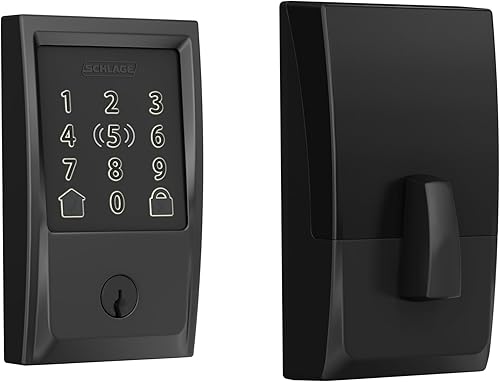
Schlage Encode Plus
Built-in WiFi means no separate hub, and the Schlage Home app ties multiple locks to one landlord account. Add a move-in code, delete a move-out code, and check activity logs from your phone without driving to the unit.
See Schlage Encode Plus →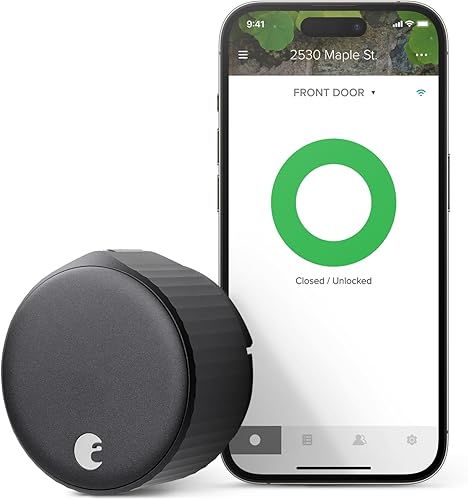
August WiFi Smart Lock (4th Gen)
Mounts on the interior side of the existing deadbolt and leaves the original exterior hardware and keyway untouched, so it comes off cleanly at the end of a lease and satisfies landlords who won't allow permanent lock swaps.
See August WiFi Smart Lock →Owning the property changes the calculus entirely from renting one out. You're not worried about impressing a guest for a weekend, you're worried about what happens on move-out day, how many of these you need to buy, and whether the unit even has WiFi yet.
Full Comparison Table
The Airbnb host guide weighs guest-code capacity above everything else. A landlord's priorities are different: rekeying between tenants, whether the lock needs WiFi to function at all, and per-door cost once you own more than one unit.
| Lock | WiFi required | Rekey backup key without a locksmith | Remote code management | Price |
|---|---|---|---|---|
| Kwikset SmartCode 270 | No | Yes (SmartKey Re-Key Technology) | No (keypad only) | $$ |
| Schlage Encode Plus | Yes, built in | No (standard cylinder) | Yes, via Schlage Home app | $$$ |
| August WiFi Smart Lock (4th Gen) | Yes | No (original keyway untouched) | Yes, via August app | $$$ |
Price tiers are approximate. $ = under $50, $$ = $50 to 150, $$$ = $150 to 300, $$$$ = over $300. Tap any link for the current Amazon price.
Notice the trade: the only lock that never needs WiFi is also the only one without remote code management. For a landlord who visits the property anyway between tenants, that's rarely a problem. For a landlord managing units in another state, it can be a dealbreaker.
What Owners Actually Report
Rental use puts a different kind of wear on a lock than a homeowner's front door: more code changes, longer stretches unattended, and sometimes months between visits. Here's what verified buyers flag once the lock has been through a few tenants.
Kwikset SmartCode 270
Owners consistently report that the standalone design is the whole appeal for rental use: no app to configure, no WiFi credentials to hand off, and a new code can be set at the keypad in under a minute. The most common complaint centers on the keypad backlight being hard to see in direct sunlight on south-facing doors, a minor issue but worth knowing before mounting it on an exposed unit.
Schlage Encode Plus: 4.0-star average from verified buyers
Owners consistently report the keypad holding up to heavy daily use, with one long-term buyer noting batteries lasting three months and counting under regular traffic. The recurring caveat across reviews is that Apple Home Key pairing can feel buggy on first setup, a non-issue for tenants who will never use it, but worth testing before a move-in day rather than after.
August WiFi Smart Lock (4th Gen): 4.1-star average from verified buyers
Owners like that it preserves the original exterior lock and key, which several called out as the deciding factor for a unit they didn't want to modify. The most-cited frustration is initial WiFi pairing taking longer to settle than expected, with one buyer describing weeks of intermittent auto-lock behavior before a firmware update resolved it, worth budgeting extra setup time for on move-in day.
Jacob’s read on this category
A rental lock earns its keep between tenants, not during one. Ask what happens the day the lease ends before you ask about ecosystem badges: can you kill the old code without driving over, and if a physical key got copied, can you fix that yourself or does it mean a locksmith invoice. The WiFi locks win the first question, the Kwikset wins the second, and most landlords will eventually own both answers across a portfolio of units.
Rekeying Between Tenants, and Why It's Different With a Smart Lock
With a traditional deadbolt, a landlord rekeys or replaces the lock between tenants because there's no way to know if a copy of the physical key exists. A code-based smart lock mostly sidesteps that problem: delete the outgoing tenant's code and set a new one, and the door is secure again in under a minute, no cylinder work involved.
The wrinkle is the physical backup key every lock in this guide still ships with. If a tenant had that key copied, the code alone doesn't fix it, the physical cylinder is still compromised. This is where the fingerprint lock and keypad lock categories genuinely differ from each other: the Kwikset SmartCode 270 uses Kwikset's SmartKey Re-Key Technology, which lets you rekey that backup cylinder yourself with a small included tool in about 10 seconds, no locksmith required. The Schlage Encode Plus and August WiFi Smart Lock both use a standard cylinder for their physical backup key, so rekeying that specific cylinder means either a locksmith visit or ordering a replacement cylinder from the manufacturer.
For a landlord who wants to fully close the loop on a departing tenant's access without any specialty tools, that difference tips the Kwikset ahead for anyone who takes physical-key exposure seriously.
Why WiFi Dependence Matters More for a Vacant Unit
A homeowner's WiFi is already running when a smart lock goes on the door. A rental unit between tenants often isn't; the outgoing tenant canceled their internet plan, and the incoming one hasn't set theirs up yet. That gap can stretch for days or weeks.
The Kwikset SmartCode 270 never needs WiFi in the first place, so you can program the new tenant's move-in code at the keypad before they've even signed a lease, let alone activated internet service. The Schlage Encode Plus and August WiFi Smart Lock will still open with whatever code was set the last time they had a connection, but neither one lets you add, change, or remotely revoke a code until the unit's router is back online and the lock reconnects to it. For a landlord juggling turnover on a tight schedule, that's the difference between handing over a working lock on day one and waiting on an internet installation appointment first.
Which Lock Should You Buy?
Frequently Asked Questions
How We Research
We started from our existing verified lock lineup, cross-checked each model's current listing for keypad hardware, connectivity requirements, and rekey capability, and confirmed pricing tiers against live Amazon listings. We then walked the star-rating distribution on each ASIN to pull owner feedback specific to rental and multi-unit use rather than a single homeowner's day-to-day. Stock and pricing were re-checked on 2026-07-30.
We do not take payment from Kwikset, Schlage, August, or any brand mentioned here. If you spot an error, please let us know.
Prices and availability reflect Amazon listings at time of writing. Confirm on the product page before purchase.