Quick answer: the Wyze Cam v4 is our top overall pick (The renter no-brainer); the Arlo Pro 5 (Sticks to your balcony railing) and the Ring Battery Doorbell Plus (Peephole mount, no drilling) are the standout alternatives.
Our Top Picks for Apartments
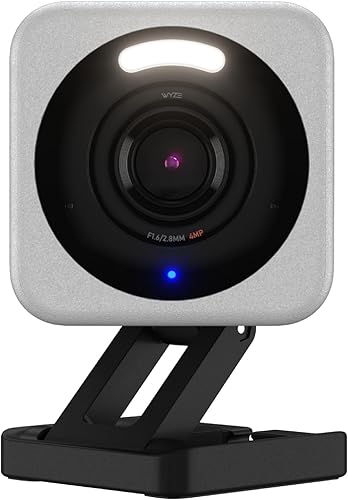
Wyze Cam v4
2K resolution with a magnetic base that sticks to any metal surface. microSD storage, a free cloud tier, and it's inexpensive. Plug it in, stick it on a shelf or fridge, done. Nothing to patch when you move out.
View on Amazon →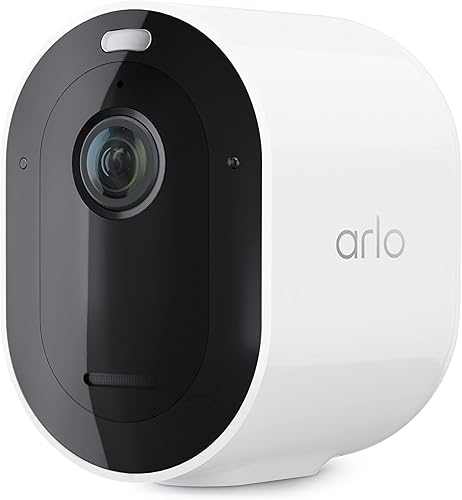
Arlo Pro 5
Battery-powered with a magnetic mount. Stick it to a window frame or metal balcony railing without a single screw. 2K HDR, color night vision, and about six months between charges.
View on Amazon →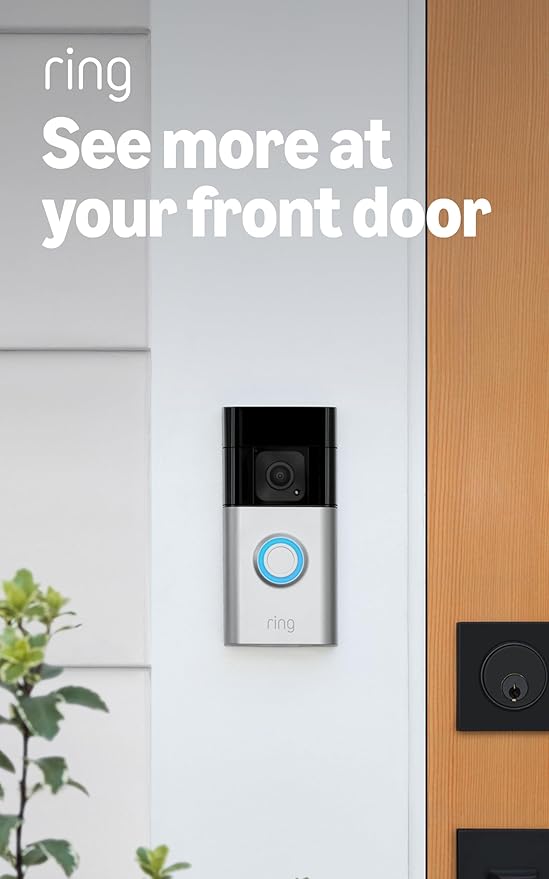
Ring Battery Doorbell Plus
Runs entirely on battery. No existing doorbell wiring needed. Mounts with adhesive or a peephole adapter. 1080p HDR head-to-toe video. You'll see whoever's at your door from your phone, even if your building has no buzzer.
View on Amazon →What Apartment Renters Need in a Camera
If you own a house, you drill holes wherever you want and run cables through walls. Apartment living is a completely different situation. You probably can't drill into exterior walls. You might not have a doorbell to wire into. Your landlord might not allow anything mounted in the hallway. And whatever you put up, you need to take down cleanly when you leave.
That narrows the field a lot. A renter-friendly camera has to check every one of these boxes:
- No-drill mounting. Magnetic bases, adhesive strips, or freestanding placement on a shelf or windowsill.
- No hardwiring. Battery-powered or plug-in to a standard outlet, no low-voltage wiring through walls.
- Compact form factor. Small enough that it doesn't take over a windowsill or bookshelf.
- Easy removal. Nothing that leaves screw holes, anchors, or permanent adhesive residue.
- Self-contained storage. microSD or cloud, so you don't need a separate NVR box eating closet space.
Every camera in the comparison below clears all five. We cut anything that needs drilling, hardwiring, or a base station bigger than a coffee mug.
Renter-Friendly Camera Comparison
All six cameras below work in apartments without drilling or permanent modifications. Click any column header to sort.
| Camera | Resolution | Mount Type | Storage | Price | Link |
|---|---|---|---|---|---|
| Wyze Cam v4 | 2K | Magnetic base / shelf | microSD + cloud (free tier) | $ | View |
| Arlo Pro 5 | 2K HDR | Magnetic mount / battery | Cloud (sub) + local USB | $$ | View |
| Ring Indoor Cam (2nd Gen) | 1080p | Plug-in / shelf / adhesive | Cloud (sub required) | $ | View |
| TP-Link Tapo C520WS | 2K QHD | Plug-in / desk mount | microSD + cloud | $ | View |
| eufy Indoor Cam S350 | 4K dual lens | Plug-in / shelf | Local (microSD / HomeBase) | $$ | View |
| Ring Battery Doorbell Plus | 1080p HDR | Adhesive / peephole mount | Cloud (sub required) | $$ | View |
Price tiers are approximate. $ = under $50, $$ = $50 to 150, $$$ = $150 to 300, $$$$ = over $300. Tap any link for the current Amazon price.
What Apartment Renters Actually Report
Because apartment buyers hit different problems than homeowners (thin walls, window-mount glare, landlord rules), here's what verified renters and city buyers are saying about each of these cameras. Quotes from top-helpful Amazon reviews, pulled May 23, 2026.
Wyze Cam v4 (4.4 stars from verified buyers)
A verified owner writes, "This camera at this price cannot be beaten... Crystal clear picture even on 2.5." Another buyer flags the sub trap: "If you want the 'Ai' to work... You need to pay for the subscription." Using just a microSD card still gets you motion recordings without the fee.
Arlo Pro 5 (3.9 stars across a thin review base)
Small review pool on this SKU. A positive buyer calls it a "Great 2K outdoor camera" with solid band-switching. A 2-star warning: "Customer service is horrid. Software is down often. And needs a pricy subscription." If your balcony never sees power, the magnetic mount is still the cleanest no-drill option here.
Ring Indoor Cam 2nd Gen (4.7 stars from verified buyers)
The most-helpful review (464 votes) is literally from an apartment renter: "I live on the first floor of an apartment building. We are not allowed to install outdoor cameras... My only other option was to buy indoor cameras that face out the windows." Another owner notes the privacy shutter "can close the cover over the camera to shutdown the video and cut the audio."
TP-Link Tapo C520WS (4.4 stars from verified buyers)
The top-helpful review (238 votes) left Wyze for this one: "truly need no subscription, have fantastic features in their app, can record locally to an SD card." Owners praise the pan/tilt coverage. Just pick your outlet placement carefully, since the cord won't reach around corners.
eufy Indoor Cam S350 (4.4 stars from verified buyers)
One verified owner writes, "The video quality is sharp and clear, and the 360 pan and tilt work smoothly." A pro-privacy review is blunt: "Say goodbye to all those subscription based systems!! These cameras are phenomenal." Occasional glitches show up in 4-star reviews: "every now and then it seems to wig out."
Ring Battery Doorbell Plus (4.5 stars from verified buyers)
A verified buyer writes, "head to toe viewing area is a stand out feature. I can see packages sitting right against the door." The cold-weather watchout: one owner says "Since the cold weather arrived I've needed to bring the device inside to charge several times." Plan on a USB-C top-up every 1 to 3 months.
Jacob’s read on this category
The recharge cycle decides whether a renter camera survives its first winter. Cold weather shortens battery life, and the owner reports above about bringing units inside to charge are the predictable result of pointing a battery camera at a snowy walkway. The magnetic and adhesive mounts that make these picks lease-friendly also make that chore painless, which matters more than an extra notch of resolution. And if an outlet sits within reach of the spot you want covered, a plug-in model removes the problem entirely.
Indoor vs Window-Mounted Outdoor
Most apartment dwellers can't mount a camera on the outside of the building. That leaves two real options for watching what happens outside. Either a dedicated indoor camera pointed out a window, or a battery-powered camera placed on a balcony or windowsill.
Pointing an indoor camera through a window
It works, but there are gotchas. IR night vision bounces straight off glass. You'll get a white glare instead of footage after dark. You need a camera with either color night vision (which uses a spotlight, also useless through glass) or one where you can disable the IR LEDs entirely and rely on ambient light. The Wyze Cam v4 lets you turn off IR LEDs in the app, and its starlight sensor pulls in enough light from a streetlit parking lot to produce a usable image. Place the lens flush against the window to kill reflections.
Motion detection through glass also gets flaky. PIR (heat-based) sensors don't work through glass at all. You need a camera that uses pixel-based motion detection, which the Wyze, Tapo, and eufy models all support. Expect more false triggers from headlights and tree shadows.
Balcony or windowsill placement
If you have a covered balcony, a battery-powered camera like the Arlo Pro 5 is the cleanest solution. Its magnetic mount attaches to a metal railing, and the battery lasts roughly 3 to 6 months depending on how much motion it records. No outlet needed, no wires hanging off your balcony. Pull it inside to charge via USB-C, then stick it back up. For uncovered balconies, the Arlo Pro 5 is weather-rated IP65, so rain isn't a concern. Just bring it in during serious storms to protect the magnetic mount.
Battery vs Plug-In for Apartments
This is the first real decision. The right answer depends on where you want the camera.
Plug-in cameras
The Wyze Cam v4, Ring Indoor Cam, TP-Link Tapo C520WS, and eufy Indoor Cam S350 all need a power outlet. They record continuously (or on motion) without battery worries. The tradeoff is that you need an outlet nearby and you'll have a visible power cable. For a bookshelf, kitchen counter, or desk near a window, fine. For a spot with no outlet within six feet, you're running an extension cord, which looks messy and creates a trip hazard.
Best use case: living room, nursery, inside of the front door, kitchen, any spot within cord reach of an outlet. If you want 24/7 continuous recording, plug-in is your only realistic option. Battery cameras only record on motion events to save power.
Battery-powered cameras
The Arlo Pro 5 and Ring Battery Doorbell run on rechargeable batteries. You can place them anywhere: balcony, window frame, front door. No wires. The downside is maintenance. The Arlo needs a charge every 3 to 6 months, and the Ring doorbell every 1 to 3 months depending on traffic at your door. In a busy apartment hallway, the Ring might need monthly charging.
Best use case: balconies, front doors with no wiring, windowsills with no nearby outlet, anywhere running a cable is impractical or not allowed.
Video Doorbell Options for Renters
A video doorbell is the single most useful security upgrade for an apartment. Package theft from apartment hallways is rampant, and seeing and talking to whoever's at your door from your phone (delivery drivers, unexpected visitors, your landlord) is genuinely useful day to day.
The catch: traditional video doorbells replace an existing wired doorbell, which most apartments either don't have or won't let you modify. The Ring Battery Doorbell sidesteps that problem entirely.
Adhesive mount
Ring includes an adhesive mount in the box. Clean the surface next to your door frame with the included alcohol wipe, peel the backing, press the bracket on, and snap the doorbell into it. It holds firmly and peels off clean when you move. No screws, no holes, no landlord conversation. The camera covers the area directly in front of your door with a 1080p, head-to-toe vertical field of view designed specifically for seeing people standing at a door.
Peephole mount
Ring also sells a peephole adapter kit that lets you mount the doorbell directly over your door's existing peephole. This is the least invasive option possible. You're literally using a hole that already exists. The doorbell hangs on the outside, the backplate screws into the peephole threading on the inside, and the whole thing comes off in 30 seconds when you move. Your peephole goes back to being a peephole.
Battery reality check
The Ring Battery Doorbell lasts 1 to 3 months per charge in a typical apartment hallway. High-traffic buildings (lots of people walking past triggering motion events) drain it faster. You can stretch battery life by setting motion sensitivity to low and limiting the motion zone to just the area in front of your door rather than the whole hallway. Charging takes about five hours via USB-C. Pop it off the mount, charge inside, snap it back.
Ring does require a Ring Protect subscription ($4.99/month) to save clips. Without it, you get live view and real-time notifications but no recorded history. For a single doorbell, the $4.99/month plan is all you need.
What About Your Lease?
Before you mount anything outside your unit's front door or on a shared balcony, check two things.
- Your lease agreement. Look for clauses about "modifications," "fixtures," "exterior installations," or "common area" usage. Most leases prohibit drilling or permanent alterations, which is exactly why we focus on adhesive and battery-powered options. A camera sitting on your windowsill inside your apartment is almost never an issue. A doorbell camera in a shared hallway is where things get murkier.
- Your building's rules or HOA policies. Some condo associations and managed apartment buildings have explicit camera policies. A few ban hallway-facing cameras outright for privacy reasons. Others allow them but ask you to notify property management first. A quick email takes five minutes and prevents a confrontation later.
Indoor cameras inside your own unit are your business. You don't need permission to put a Wyze on your bookshelf. The gray area is anything that records outside your unit: hallways, parking lots, shared balconies. When in doubt, ask first, install second. A written email gives you paper documentation if it ever comes up.
Which Camera Should You Get?
For most apartment renters, start with the Wyze Cam v4. At its low price, the risk is basically zero. If it does what you need, you saved a meaningful amount compared to most alternatives. Want more coverage? Add a Ring Battery Doorbell for the front door and you've covered the two most important angles in an apartment (the interior and the entry point) for a modest total with zero permanent modifications to your unit.
How We Research
Every camera on this list had to pass the renter filter: no drilling, no hardwiring, no lease violations. We verified that each one can mount with adhesive, magnets, or just sit on a shelf, then checked owner photos inside Amazon reviews to confirm those mounts actually hold up past a month. Pricing and stock got re-checked against the live Amazon listings on 2026-05-12. We also dug through reviews specifically from apartment and condo buyers (they tend to self-identify) to surface the issues that only hit renters, like window-glass IR glare and doorbell batteries dying faster in cold stairwells.
We don't take payment from manufacturers. Rankings come from specs plus what verified renters say after a few months of use. Spot an error? Please let us know.